The Monitoring page provides a detailed audit trail of all identity and authentication events across your Agen for Work environment. It also lets you stream these logs to external observability platforms for centralized analysis, alerting, and compliance reporting.
To access the Monitoring page, click the Monitoring icon in the left sidebar.
The page is organized into two tabs: Logs and Stream.
The Logs tab displays a chronological record of authentication and identity events. Use this tab to investigate user activity, troubleshoot access issues, and audit security-related events.
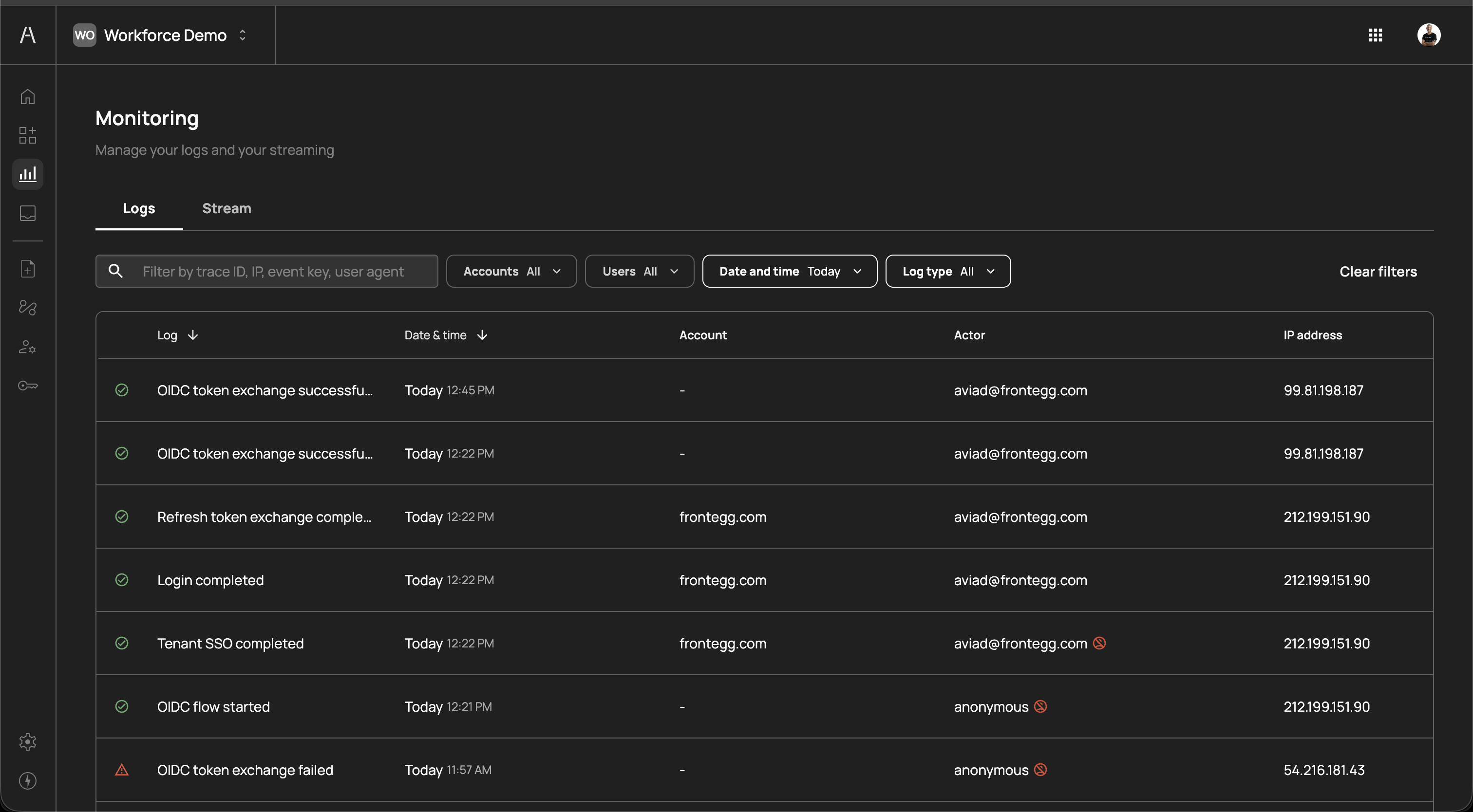
The page header reads "Manage your logs and your streaming" and includes a set of filters and a search field above the logs table.
The following filters are available to narrow the log view:
| Filter | Description |
|---|---|
| Search | Free-text search by trace ID, IP address, event key, or user agent |
| Accounts | Filter by account (organization). Defaults to All. |
| Users | Filter by specific user. Defaults to All. |
| Date and time | Filter by time range (e.g., Today, or a custom date range) |
| Log type | Filter by event type. Defaults to All. |
Click Clear filters on the right to reset all filters to their default values.
The logs table includes the following columns:
| Column | Description |
|---|---|
| Log | The event description with a status icon. A green checkmark indicates a successful event; a yellow warning triangle indicates a failed event. Examples include "OIDC token exchange successfu...", "Refresh token exchange comple...", "Login completed", "Tenant SSO completed", "OIDC flow started", "OIDC token exchange failed". |
| Date & time | The timestamp of the event (e.g., "Today 12:45 PM") |
| Account | The account (organization) associated with the event. Displays a dash (—) for events not tied to a specific account. |
| Actor | The user or entity that triggered the event (e.g., aviad@frontegg.com, anonymous). Some actors may display additional icons indicating specific attributes. |
| IP address | The source IP address of the event (e.g., 99.81.198.187, 212.199.151.90) |
You can sort the table by clicking on the Log or Date & time column headers.
The following are examples of events you may see in the logs:
| Event | Description |
|---|---|
| Login completed | A user successfully authenticated into Agen for Work |
| Tenant SSO completed | A user completed single sign-on through their identity provider |
| OIDC token exchange successful | An OpenID Connect token was successfully exchanged, typically during AI agent authentication |
| OIDC token exchange failed | An OIDC token exchange attempt failed, which may indicate a misconfigured connector or expired credentials |
| Refresh token exchange completed | A session token was successfully refreshed |
| OIDC flow started | An OpenID Connect authentication flow was initiated |
Failed events (marked with a warning icon) do not necessarily indicate a security issue — they can result from expired sessions, misconfigured integrations, or users canceling authentication flows. Investigate recurring failures to determine whether action is needed.
The Stream tab lets you forward your Agen for Work logs to external observability and security platforms in real time. Streaming enables centralized log management, long-term retention, and integration with your existing SIEM or monitoring infrastructure.
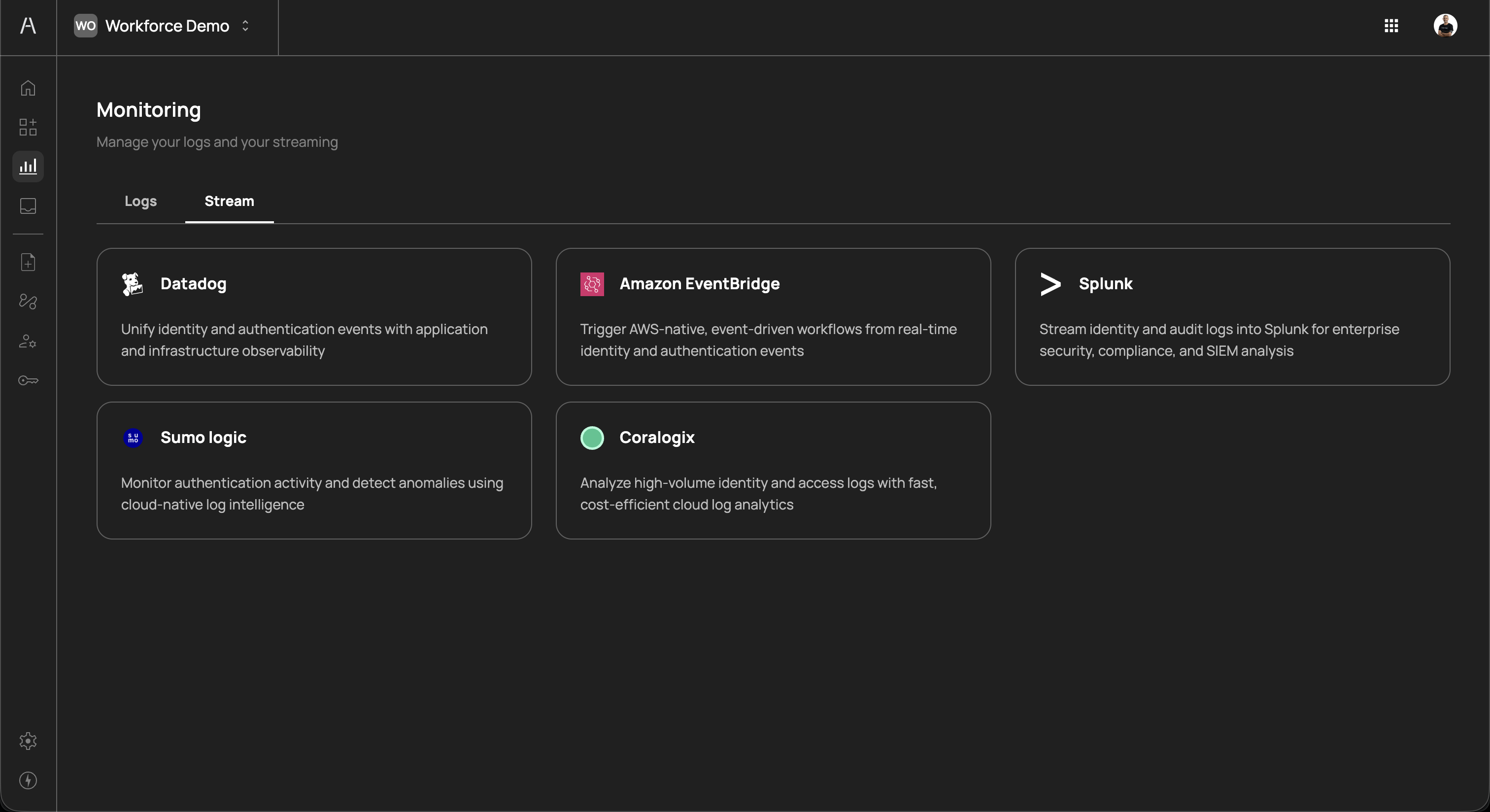
The following platforms are supported as streaming destinations:
| Platform | Description |
|---|---|
| Datadog | Unify identity and authentication events with application and infrastructure observability |
| Amazon EventBridge | Trigger AWS-native, event-driven workflows from real-time identity and authentication events |
| Splunk | Stream identity and audit logs into Splunk for enterprise security, compliance, and SIEM analysis |
| Sumo Logic | Monitor authentication activity and detect anomalies using cloud-native log intelligence |
| Coralogix | Analyze high-volume identity and access logs with fast, cost-efficient cloud log analytics |
Each platform card displays the platform name, icon, and a brief description of its integration capabilities.
Click on a platform card to begin the configuration process. Each platform has a guided setup flow that walks you through the required connection details, such as API keys, endpoint URLs, or event bus ARNs. Once configured, logs are streamed to the destination in real time.
You can configure multiple streaming destinations simultaneously. For example, you might stream to both Datadog for real-time monitoring and Splunk for long-term compliance archival.
- Security investigations — Use the Logs tab to trace authentication events for a specific user or IP address when investigating suspicious activity
- Access troubleshooting — Filter by a specific user to identify why their AI agent failed to authenticate or exchange tokens
- Compliance auditing — Export or stream logs to meet regulatory requirements for identity and access event retention
- Anomaly detection — Stream logs to a SIEM platform to set up alerts for unusual patterns such as repeated token exchange failures or logins from unexpected IP addresses
- Incident response — Correlate Agen for Work authentication events with application logs in your observability platform to build a complete timeline during security incidents
- Review failed events regularly — Check for recurring OIDC token exchange failures or login errors, which may indicate misconfigured connectors or compromised credentials
- Set up streaming early — Configure at least one streaming destination to ensure you have a durable log archive beyond what the Agen for Work UI retains
- Use filters to narrow investigations — When troubleshooting, combine the Users and Date and time filters to quickly isolate relevant events
- Monitor anonymous actors — Events from anonymous actors typically represent the start of authentication flows before a user is identified. Repeated failures from anonymous actors at unusual IP addresses may warrant investigation.
- Integrate with your SIEM — Stream to your existing security platform (e.g., Splunk, Datadog) to correlate AI agent authentication events with other security signals across your organization
- Dashboard — View high-level metrics for AI agent activity and policy enforcement
- Policies — Review and adjust access control policies based on monitoring insights
- Identity provider — Manage SSO and SCIM connections that generate authentication events
- Settings — Configure your Agen for Work environment settings