Tools are the fundamental building blocks of Agen for SaaS. Each tool represents a single API operation — an endpoint that AI agents can discover, understand, and invoke through your MCP Gateway.
A tool is a structured definition of an API operation that includes everything an AI agent needs to understand and call it:
| Property | Description | Limit |
|---|---|---|
| Tool name | A unique identifier for the tool (e.g., Create_a_new_expense, Delete_receipt). | — |
| Tool description | A human-readable explanation of what the tool does. AI agents use this to decide when and how to invoke the tool. | 2,000 characters |
| Tool API | The HTTP method (GET, POST, PUT, DELETE) and path (e.g., /api/receipts/{id}). | — |
| Source name | The source this tool was generated from (e.g., default, Frontegg). | — |
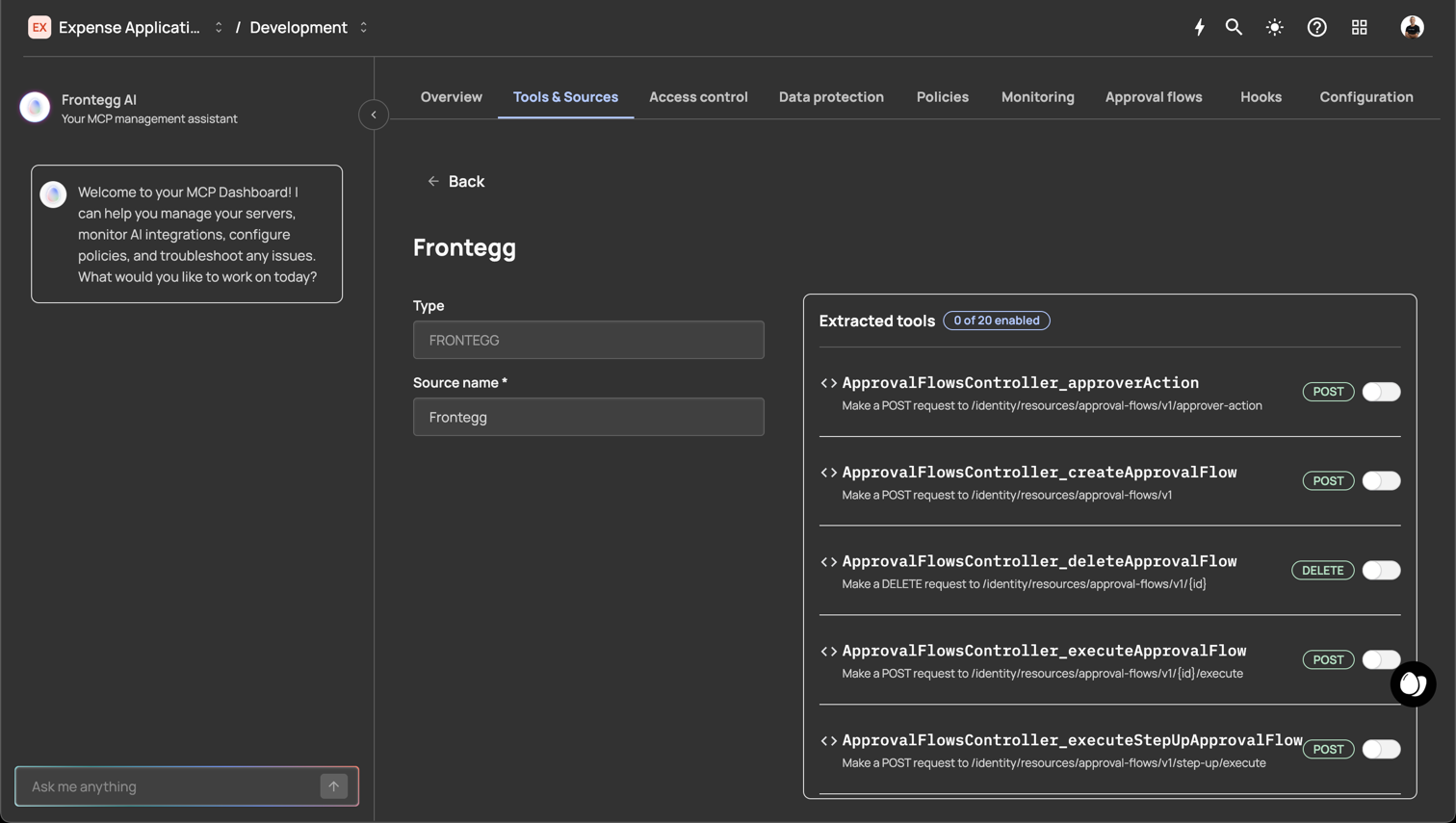
Tools are automatically generated when you add a source to your Agen for SaaS instance:
- REST sources — Each endpoint defined in your OpenAPI specification becomes a tool. The tool name, description, method, and path are extracted from the spec.
- GraphQL sources — Each query and mutation in your GraphQL schema becomes a tool.
- MCP server sources — Tools are discovered dynamically from the remote MCP server.
- Frontegg source — Built-in tools that expose Frontegg platform capabilities (e.g.,
ApprovalFlowsController_createApp...,GeoFencesTenantController_create...).
After generation, every tool property is fully editable.
When an AI agent interacts with your MCP Gateway:
- Discovery — The agent calls the MCP
list_toolsendpoint. Agen for SaaS returns all enabled tools that the user has access to (filtered by access control rules and List tools hooks). - Selection — The AI agent reads tool descriptions and selects the appropriate tool for the user's request.
- Invocation — The agent calls the tool with the required parameters. Agen for SaaS routes the request through the full governance pipeline:
- Authentication — Validates the user's identity token.
- Access control — Checks role/permission mappings.
- Policies — Evaluates conditional rules (deny, step-up, approval).
- Hooks — Executes any active Call tool hooks.
- Data protection — Masks sensitive fields in the response.
- Forwarding — If all checks pass, the request is forwarded to the tool's API endpoint at the source's base URL.
- Response — The API response passes back through the pipeline (data protection masking is applied) and is returned to the AI agent.
- Logging — The entire interaction is recorded in the monitoring system.
Every tool call passes through multiple security layers:
| Layer | What it does |
|---|---|
| Access control | Ensures the user's JWT contains the required roles or permissions to invoke the tool. |
| Policies | Evaluates conditional rules based on request attributes (IP, amount, country) and enforces deny, step-up, or approval actions. |
| Data protection | Masks sensitive fields (PII, PHI, PCI) in tool responses based on compliance policies. |
| Hooks | Executes custom JavaScript logic that can allow or deny the request. |
| Monitoring | Logs the tool call, parameters, response, and all policy decisions for audit. |
Tools follow this lifecycle:
- Generated — Created automatically from a source (REST, GraphQL, MCP, or Frontegg).
- Enabled — Active and discoverable by AI agents. This is the default state after generation.
- Disabled — Not discoverable by AI agents. The tool definition is preserved but hidden from discovery.
- Edited — Tool properties (name, description, method, path) can be modified at any time.
- Deleted — Permanently removed. This action cannot be undone.
- Write clear descriptions — AI agents rely on tool descriptions to understand what each tool does. Include the action performed, expected inputs, and what the response contains.
- Use consistent naming — Follow a naming convention that groups related tools (e.g.,
Create_expense,Get_expense_by_ID,Delete_expense). - Disable unused tools — If a tool is not needed, disable it rather than deleting it. This keeps the definition available for future use.
- Review generated tools after import — Auto-generated names and descriptions may need refinement for clarity.
- Combine with access control — Restrict sensitive tools to specific roles or permissions rather than leaving them broadly available.