Data protection in Agen for SaaS enables you to mask sensitive information in tool responses before they reach AI agents. This ensures compliance with regulations like GDPR, HIPAA, CCPA, and PCI DSS by preventing sensitive data from being exposed through AI interactions.
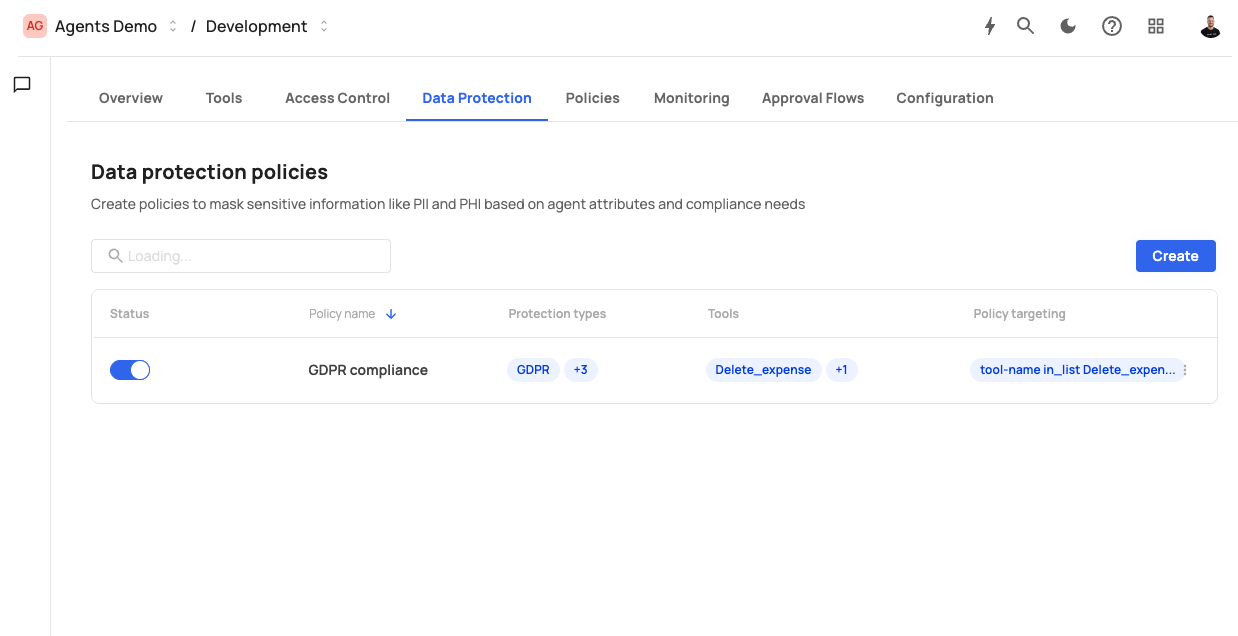
The Data protection screen displays the following header:
Data protection policies — Create policies to mask sensitive information like PII and PHI based on agent attributes and compliance needs
The screen includes a search bar and a Create button. Existing policies are displayed in a table with the following columns:
| Column | Description |
|---|---|
| Status | A toggle switch to activate or deactivate the policy. |
| Policy name | The name of the policy (e.g., "Mask PII"). |
| Protection types | Badges showing the compliance categories applied (e.g., GDPR +3). |
| Tools | The tools this policy applies to, shown as badges (e.g., List_all_expenses). |
| Policy targeting | The conditional expression that determines when the policy is applied (e.g., country in_list US). |
Each row has a three-dot menu for editing or deleting the policy.
Click Create to open the policy creation dialog. The dialog contains the following fields:
A descriptive name for the policy (e.g., "Mask PII", "HIPAA compliance").
A brief description of what the policy protects. Maximum 180 characters.
Placeholder: "Describe what this policy protects"
A multi-select dropdown to choose which categories of sensitive data to mask. Data types are organized by regulatory framework, with a Select all option for each category:
PHI — Protected Health Information (39 types) Includes health-related identifiers such as:
- Au Medicare
- Canada Health Service Number
- Canada Personal Health Id Number Phin
- Canada Social Insurance Number
- Dutch Bank Account Number
- Email Address
- Germany Drivers License Number
- Germany Id Number
- Germany Passport Number
- And 30 more types
Additional categories include PII, GDPR, PCI DSS, CCPA, and COPPA, each containing relevant data type definitions.
Assign the policy to specific tools. Only tool responses from the selected tools are subject to masking.
Placeholder: "Select policy tools"
Define conditional expressions that determine when the masking policy is applied. Targeting uses the same expression builder as policies:
IF [Attribute] [Operator] [Value]
| Component | Description | Example |
|---|---|---|
| Attribute | The request attribute to evaluate. | Country |
| Operator | The comparison operator. | In |
| Value | The value(s) to compare against. Multiple values can be selected. | United States |
Click + and to add additional conditions. All conditions must be true for the policy to apply. Click the minus icon to remove a condition.
Click Create to save the policy, or Cancel to discard.
When an AI agent invokes a tool that has an active data protection policy:
- The tool call passes through authentication, access control, and policies as normal.
- The request is forwarded to the tool's API endpoint.
- The API response is intercepted by the data protection layer.
- If the policy's targeting conditions match the request context, Agen for SaaS scans the response for the configured data types.
- Any matching sensitive data is masked or redacted before the response is returned to the AI agent.
Data protection is applied after the API returns its response and before the response reaches the AI agent, ensuring sensitive data never leaves your governance boundary.
Each data protection policy has a toggle in the Status column:
- Active (toggle on) — The policy is enforced on matching tool responses.
- Inactive (toggle off) — The policy is preserved but not enforced.
Scenario: Mask all PII and GDPR-regulated data types when the requesting user is in the United States.
- Click Create.
- Set Policy name to "Mask PII".
- Select GDPR and related data type categories in Data types to protect.
- Select
List_all_expensesin Policy tools. - In Policy targeting, set: IF
CountryInUnited States. - Click Create.
Result: When a US-based user's AI agent calls the List_all_expenses tool, sensitive fields matching GDPR data types are automatically masked in the response.