Policies in Agen for SaaS are conditional guardrails that control what happens when an AI agent calls a tool. They evaluate request attributes in real time and enforce actions like denying the request, requiring additional authentication (step-up), or routing the request to an approval flow for human review.
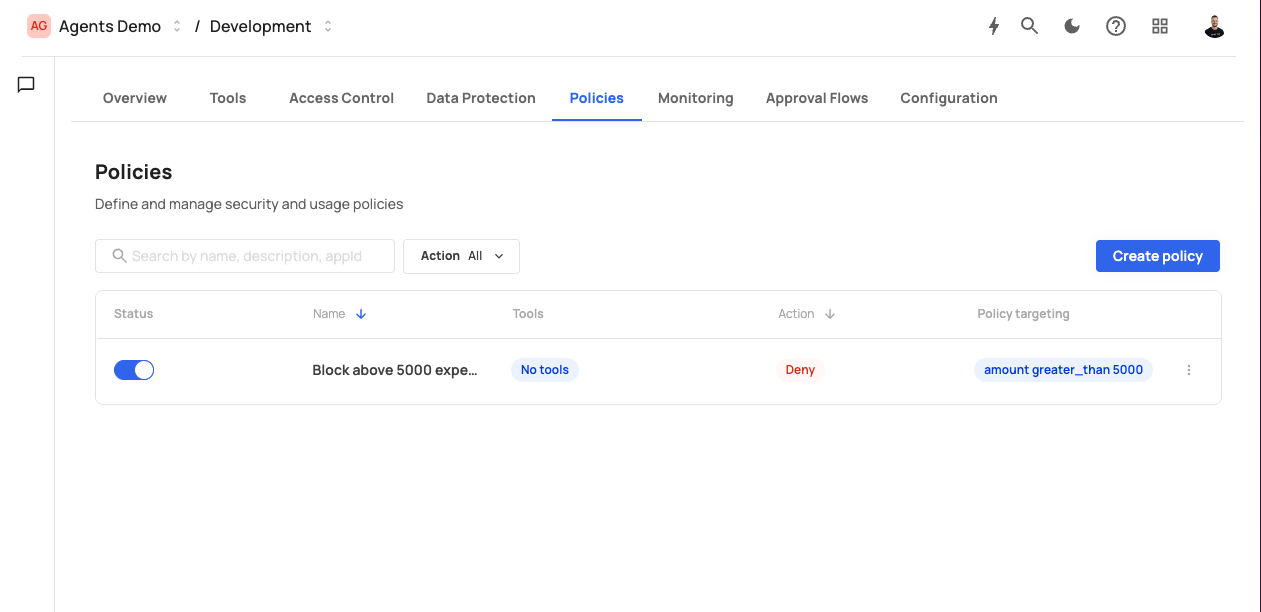
The Policies screen displays the following header:
Policies — Define and manage security and usage policies
The screen includes:
- A search bar with placeholder "Search by name, description, appId".
- An Action filter dropdown (default: "All") to filter policies by action type.
- A Create policy button.
Existing policies are displayed in a table with the following columns:
| Column | Description |
|---|---|
| Status | A toggle switch to activate or deactivate the policy. |
| Name | The policy name (e.g., "Step-up: Create expense"). |
| Tools | The tools this policy applies to, shown as badges (e.g., Create_a_new_expense). |
| Type | The policy scope: "Global" or tool-specific. |
| Action | The enforcement action: Deny, Step up, or Request approval. Step up is displayed in orange. |
| Policy targeting | A truncated view of the conditional expression (e.g., amount greater_than 10...). |
Each row has a three-dot menu for editing or deleting the policy.
Each policy enforces one of three actions when its conditions are met:
| Action | Behavior | Use case |
|---|---|---|
| Deny | The tool call is blocked immediately. The AI agent receives an error response. | Block requests from untrusted IPs, prevent unauthorized operations, enforce hard limits. |
| Step up | The user must provide additional authentication (e.g., MFA, admin token) before the tool call proceeds. | Require extra verification for high-value transactions or sensitive data access. |
| Request approval | The tool call is paused and routed to a configured approval flow. A human reviewer must approve or reject the request before it proceeds. | Enforce human oversight for critical operations like large financial transactions or data deletions. |
When Request approval is selected, a dropdown appears to choose which approval flow to use (e.g., "Approve from admins").
Policies are evaluated in the MCP Gateway pipeline after authentication and access control:
- An AI agent invokes a tool.
- Authentication validates the user's identity.
- Access control verifies the user has the required role or permission.
- Policies are evaluated: For each active policy that targets the invoked tool, Agen for SaaS checks whether the policy's conditional expression matches the request context.
- If a match is found, the policy action is enforced (deny, step-up, or approval).
- If no policies match (or all conditions evaluate to false), the request proceeds normally.
Multiple policies can apply to the same tool. They are evaluated in order, and the first matching policy's action is enforced.