Token templates allow you to customize JWT structure, claims, and behavior for different use cases. You can create multiple templates and apply them conditionally based on user attributes, token types, or other criteria.
- Navigate to [ENVIRONMENT] → Security → Token management
- Click Create Template to start creating a new template
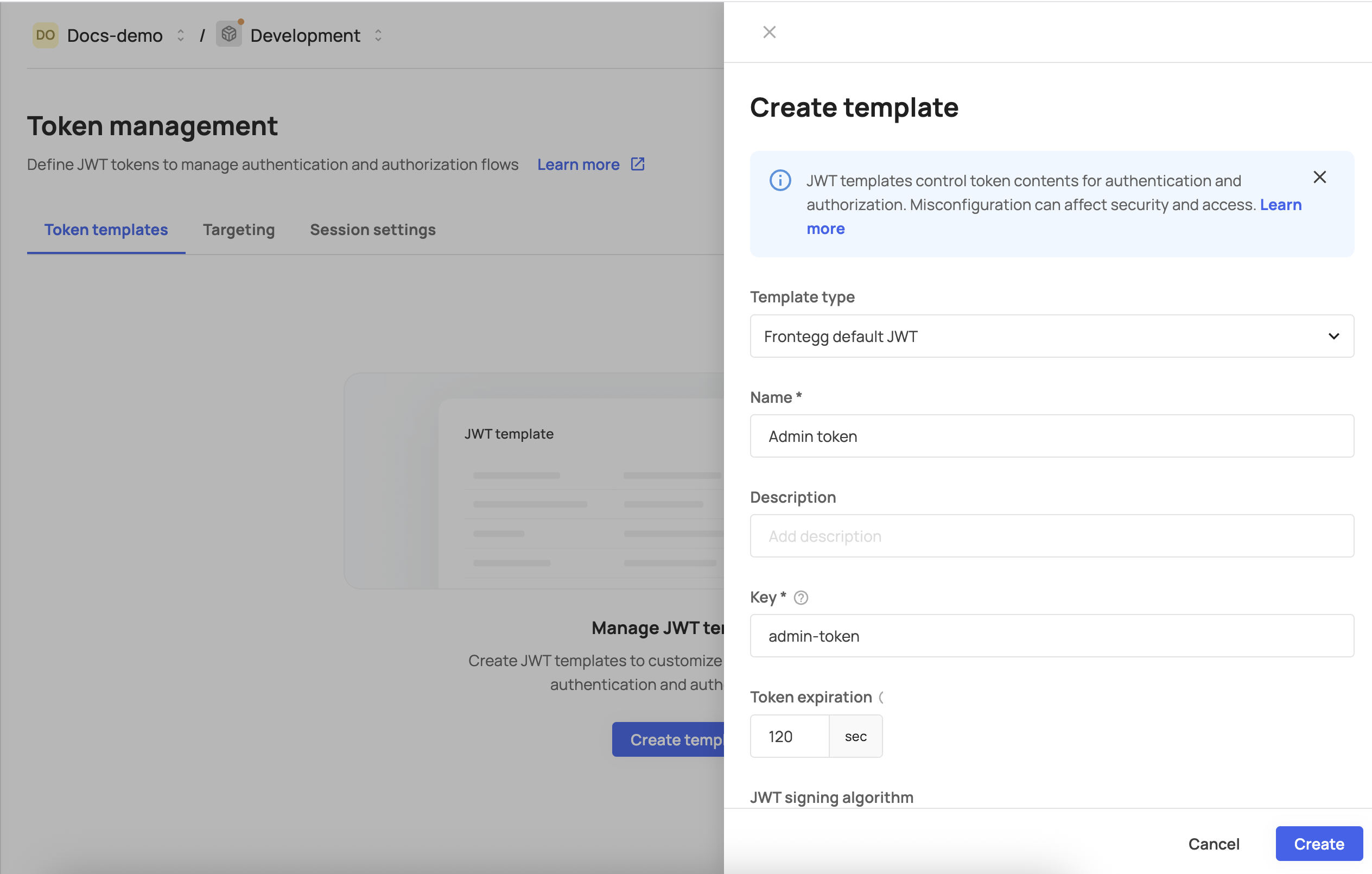
Template type
Choose your starting point:
- Frontegg default JWT: Start with Frontegg's standard JWT structure including all default claims
- Blank: Start with minimal required claims only
Template information
- Name: Descriptive name for your template
- Description: Optional description explaining the template's purpose
- Template key: Unique identifier (must be unique across your environment)
Token expiration
- Default: 300 seconds
- Configure based on your security requirements
- Shorter expiration times provide better security but may require more frequent token refreshes
JWT signing algorithm
- RS256 (recommended): Asymmetric algorithm using RSA keys
- HS256: Symmetric algorithm using shared secrets
JWT public key
- Configure the public key for token verification
- Required for RS256 algorithm
When starting from the Frontegg default, your template includes these claims:
{
  "sub": "{{sub}}",
  "name": "{{user.name}}",
  "username": "{{user.username}}",
  "email": "{{user.email}}",
  "emails": "{{user.emails}}",
  "email_verified": "{{user.verified}}",
  "phoneNumber": "{{user.phoneNumber}}",
  "metadata": "{{user.metadata}}",
  "roles": "{{user.tenant.roles}}",
  "permissions": "{{user.tenant.permissions}}",
  "groups": "{{user.groups}}",
  "tenantId": "{{user.tenantId}}",
  "tenantIds": "{{user.tenantIds}}",
  "profilePictureUrl": "{{user.profilePictureUrl}}",
  "externalId": "{{user.externalId}}",
  "planIds": "{{planIds}}",
  "featureKeys": "{{featureKeys}}",
  "sid": "{{sid}}",
  "type": "{{type}}",
  "applicationId": "{{applicationId}}",
  "aud": "{{aud}}",
  "iss": "{{iss}}",
  "iat": {{iat}},
  "exp": {{exp}}
}
Entitlement claims and token size
Entitlement claims and token size
Include planIds and featureKeys only when your application needs them. These claims can grow large when a user or account has many assigned plans or features, which increases JWT size and can affect request headers and performance. Prefer omitting them from templates that do not require entitlement data.
This matches the default Frontegg JWT structure that serves as the fallback when no custom templates are applied.
When starting from blank, your template includes only required claims:
{
  "sub": "{{sub}}",
  "aud": "{{aud}}",
  "iss": "{{iss}}",
  "iat": {{iat}},
  "exp": {{exp}}
}The main Token management page displays all templates in a table with:
- Template name: The display name of the template
- Description: Template description (if provided)
- Key: Unique template identifier
- Expiration: Token expiration time in seconds
- Created: Template creation date
- Click on any template row to open the template details page
- Modify template settings, claims, or targeting rules
- Click Save to apply changes
Template deletion rules:
- Templates currently used in targeting rules cannot be deleted
- A tooltip will indicate if deletion is disabled due to active usage
- If deletion is available, a confirmation modal will appear
To delete a template:
- Click the Delete button next to the template
- If the template is not in use, confirm deletion in the modal
- The template will be permanently removed
Templates must include these OIDC-required claims:
iss(Issuer): Identifier for the token issuersub(Subject): Unique identifier for the authenticated useraud(Audience): Intended recipient(s) of the tokenexp(Expiration Time): Token expiration timestampiat(Issued At): Token issuance timestamp
For proper Frontegg integration, include:
type: Token type identifiertenantId: Associated tenant identifier
Before saving your template, ensure:
- All required OIDC claims are included (
iss,sub,aud,exp,iat) - Frontegg required claims are present (
type,tenantId) - Template syntax is correct and uses valid template variables
- Templates cannot be saved without meeting these requirements
Configure how tokens are handled in browser sessions:
- Secure cookies: Ensure cookies are only sent over HTTPS
- SameSite policy: Control cross-site request behavior
- HttpOnly: Prevent client-side JavaScript access to tokens
Default refresh token expiration: 86400 seconds (24 hours)
Configure refresh token behavior:
- Rotation: Whether refresh tokens are rotated on use
- Maximum lifetime: Maximum time a refresh token remains valid
- Sliding expiration: Whether token lifetime extends with use
Template usage tracking
Template usage tracking
Before deleting a template, ensure it's not referenced in any targeting rules. Active templates cannot be deleted to prevent authentication failures.
Template fallback
Template fallback
If a template becomes corrupted or unavailable, Frontegg automatically falls back to the default JWT structure to ensure continuous authentication.