The Frontegg Relationship-Based Access Control (ReBac) engine provides fine-grained authorization for your application. This guide covers setting up the ReBac engine for both local development and production environments.
New Architecture
New Architecture
This setup uses the latest ReBac architecture powered by SpiceDB. The sync job continuously synchronizes your authorization schema and relationships from Frontegg to your local SpiceDB instance. For migration from the legacy Entitlements Agent, see the Migration Guide.
| Component | Role |
|---|---|
| Frontegg Cloud | Stores entity types, relations, and assignments |
| Sync Job | Pulls data from Frontegg → writes to SpiceDB (every 60s) |
| SpiceDB | Evaluates permission checks locally |
| Your App | Uses SDK to query SpiceDB for authorization decisions |
Data Flow:Frontegg Cloud → Sync Job → SpiceDB ← Your App (SDK)
- Frontegg account with ReBac feature enabled (Contact support@frontegg.com to enable it)
- Frontegg credentials (Client ID and API Key)
- Node.js v18+ (for SDK integration)
- Docker and Docker Compose (Get Docker)
Why Docker for Local?
Why Docker for Local?
Docker Compose runs the full ReBac stack locally (CockroachDB, SpiceDB, Sync Job) with a single command. This eliminates the need to install and configure each component separately.
- Container runtime (Docker, Kubernetes, or your preferred orchestration platform)
- Existing SpiceDB instance (self-hosted or managed)
- Optional: Helm v3+ (Install Helm)
| Component | Version | Notes |
|---|---|---|
| SpiceDB | v1.42.1+ | Authorization engine |
| Zed CLI | v0.30.2+ | SpiceDB management CLI |
| @frontegg/e10s-client | v3.0.0+ | Node.js SDK |
| Node.js | v18+ | Runtime requirement |
You'll need the following environment variables:
| Variable | Description | Where to Find |
|---|---|---|
FRONTEGG_CLIENT_ID | Your environment's Client ID | Portal → Keys & domains |
FRONTEGG_CLIENT_SECRET | Your environment's API Key | Portal → Keys & domains |
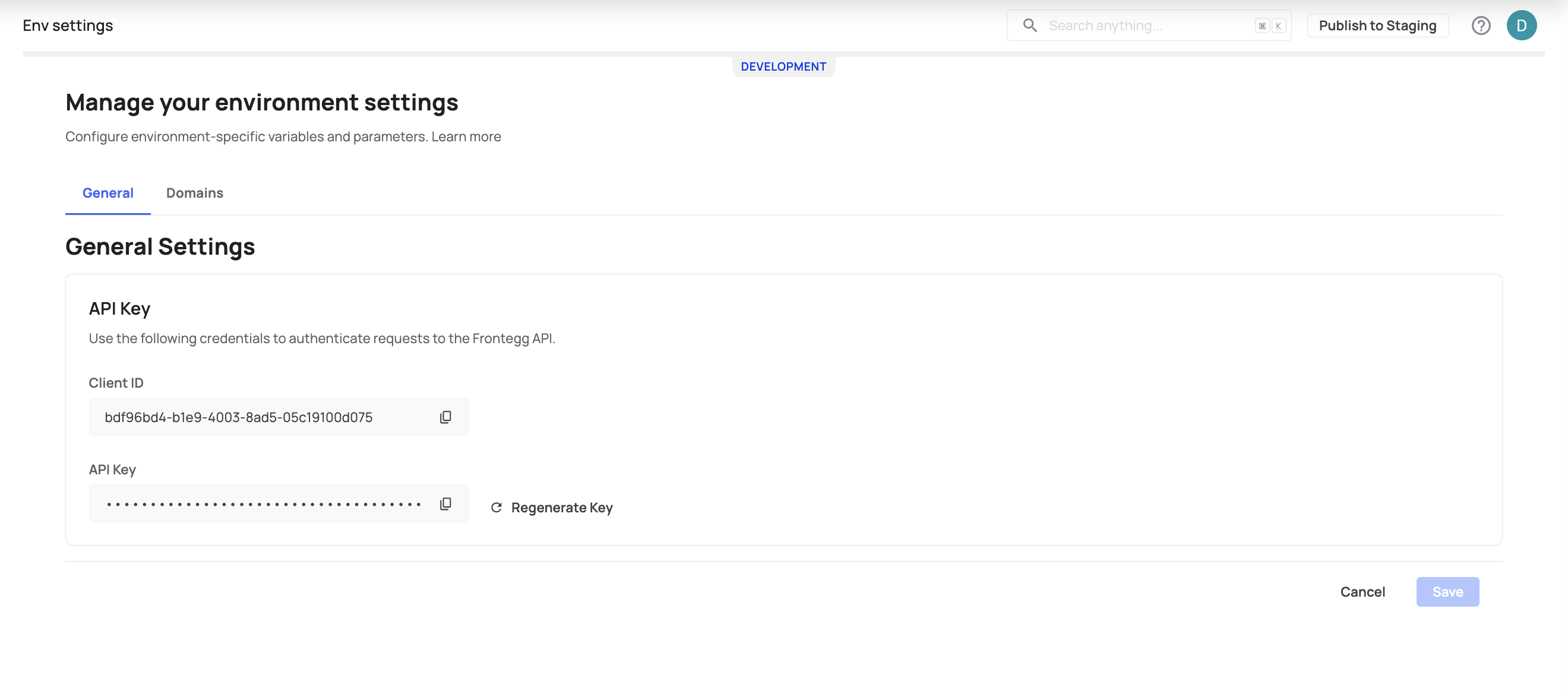
Create a .env file in your project root:
# Required Frontegg Configuration
FRONTEGG_CLIENT_ID=your-client-id
FRONTEGG_CLIENT_SECRET=your-api-key
FRONTEGG_URL=https://api.frontegg.com

# SpiceDB Configuration (defaults work for local development)
SPICEDB_GRPC_PRESHARED_KEY=spicedbCreate a docker-compose.yml file with the ReBac engine stack:
version: "3.8"

services:
  spicedb-cockroachdb:
    image: cockroachdb/cockroach:latest
    ports:
      - "26257:26257"
    volumes:
      - spicedb-cockroachdb-data:/cockroach/cockroach-data
    command: ["start-single-node", "--insecure"]
    healthcheck:
      test: ["CMD", "/cockroach/cockroach", "sql", "--insecure", "--execute", "SELECT 1"]
      interval: 10s
      timeout: 5s
      retries: 3
      start_period: 10s
    environment:
      - PGUSER=root
      - PGPASSWORD=password
      - PGDATABASE=spicedb

  spicedb-create-db:
    image: cockroachdb/cockroach:latest
    command: ["sql", "--insecure", "--host=spicedb-cockroachdb:26257", "--execute=CREATE DATABASE IF NOT EXISTS spicedb;"]
    depends_on:
      spicedb-cockroachdb:
        condition: service_healthy
    restart: "no"

  spicedb-migrate:
    image: authzed/spicedb:v1.42.1
    command: ["datastore", "migrate", "head", "--datastore-engine=cockroachdb", "--datastore-conn-uri=postgres://root:password@spicedb-cockroachdb:26257/spicedb?sslmode=disable"]
    depends_on:
      spicedb-create-db:
        condition: service_completed_successfully
    restart: "no"

  spicedb:
    image: authzed/spicedb:v1.42.1
    ports:
      - "50051:50051"
    volumes:
      - spicedb-data:/data
    command: ["serve", "--datastore-engine=cockroachdb", "--datastore-conn-uri=postgres://root:password@spicedb-cockroachdb:26257/spicedb?sslmode=disable", "--log-level=info"]
    environment:
      - SPICEDB_GRPC_PRESHARED_KEY=${SPICEDB_GRPC_PRESHARED_KEY:-spicedb}
    healthcheck:
      test: ["CMD", "pgrep", "-f", "spicedb"]
      interval: 30s
      timeout: 10s
      retries: 3
      start_period: 10s
    depends_on:
      spicedb-migrate:
        condition: service_completed_successfully
      spicedb-cockroachdb:
        condition: service_healthy

  spicedb-sync:
    image: frontegg/e10s-engine-sync:latest
    environment:
      - FRONTEGG_CLIENT_ID=${FRONTEGG_CLIENT_ID}
      - FRONTEGG_CLIENT_SECRET=${FRONTEGG_CLIENT_SECRET}
      - FRONTEGG_URL=${FRONTEGG_URL:-https://api.frontegg.com}
      - SPICEDB_ADDRESS=spicedb:50051
      - SPICEDB_GRPC_PRESHARED_KEY=${SPICEDB_GRPC_PRESHARED_KEY:-spicedb}
    volumes:
      - spicedb-sync-logs:/var/log/spicedb-sync
    restart: unless-stopped
    healthcheck:
      test: ["CMD", "pgrep", "-f", "sync-loop.sh"]
      interval: 30s
      timeout: 10s
      retries: 3
      start_period: 10s
    depends_on:
      - spicedb
      - spicedb-cockroachdb

volumes:
  spicedb-data:
  spicedb-sync-logs:
spicedb-cockroachdb-data:Run the following command to start all services:
docker compose up -dThe sync job will automatically start fetching your authorization schema and relationships from Frontegg every 60 seconds.
Check that all services are running:
docker compose psYou should see all services in a healthy state. The SpiceDB gRPC endpoint is now available at localhost:50051.
The sync job runs as a container that connects to your SpiceDB instance. You can deploy it using any container orchestration platform. Below is an example using Helm charts for Kubernetes.
helm repo add frontegg https://charts.frontegg.com
helm repo updateCreate a values.yaml file with your configuration:
name: entitlements-engine
team: your-team

envID: production

image:
  repository: "frontegg/entitlements-engine"
  tag: "latest-withloop"

imagePullSecrets:
  - name: regcred

worker:
  enabled: true
  containerName: entitlements-engine
  replicaCount: 2
  autoscaling:
    enabled: true
    minReplicas: 2
    maxReplicas: 5
    targetCPUUtilizationPercentage: 70
  resources:
    requests:
      cpu: 200m
      memory: 512Mi
    limits:
      cpu: 1000m
      memory: 1024Mi

configmap:
  data:
    spicedbAddress: 'your-spicedb-address:50051'
    spicedbPresharedKey: "your-preshared-key"

externalSecret:
  enabled: true
  data:
    FRONTEGG_CLIENT_ID: "your-client-id"
FRONTEGG_CLIENT_SECRET: "your-api-key"helm install entitlements-engine frontegg/entitlements-engine \
-f values.yaml \
--namespace entitlements \
--create-namespaceFor production environments, we recommend the following rate limits:
| Operation | Recommended Limit | Notes |
|---|---|---|
| Check Permissions | 10,000 req/min | Per SpiceDB instance |
| Lookup Resources | 1,000 req/min | Pagination recommended |
| Lookup Subjects | 1,000 req/min | Pagination recommended |
Once the ReBAC engine is running, integrate an entitlements client into your application to perform permission checks and lookups. Node.js uses @frontegg/e10s-client (gRPC to SpiceDB); Java services can use the Entitlements client for Java (also gRPC).
SDK quickstarts
- Node.js Entitlements — npm package,
EntitlementsClientFactory, queries and lookup APIs - Java Entitlements — Maven/Gradle artifacts and JVM usage
Setup companion
- Run with SDK — detailed Node.js walkthrough (installation, configuration, subject context, queries, monitoring) aligned with this engine setup
Relations between entities are managed through the Frontegg API. The sync job automatically synchronizes these to your local SpiceDB instance.
For complete API documentation including assign, unassign, and list operations, see the Relations API Reference.
Sync Delay
Sync Delay
Relations created via the API are synchronized to your SpiceDB instance within 60 seconds (default sync interval).
grpcurl -plaintext localhost:50051 grpc.health.v1.Health/CheckThe sync job container exposes a health check that verifies the sync loop is running:
docker exec spicedb-sync pgrep -f sync-loop.sh- ReBac Configuration - Define entity types and configure relations
- Migration Guide - Migrate from legacy Entitlements Agent