Tenant-Level Policies enable your B2B customers (tenants) to define and manage their own AI governance rules within boundaries you set as the platform owner. This delegation model ensures that each organization using your platform can tailor AI agent behavior to their specific compliance requirements, risk tolerance, and operational needs—without requiring your intervention.
"One policy cannot rule them all."
Every organization has unique requirements. A financial services company needs strict transaction limits and audit trails. A startup values speed and flexibility. A healthcare provider must enforce HIPAA-compliant data handling. Tenant-Level Policies allow each customer to configure AI guardrails that match their reality—while you maintain overarching platform-level controls.
| For Platform Owners (You) | For Your Customers (Tenants) |
|---|---|
| Set immutable platform boundaries | Define organization-specific rules |
| Maintain compliance baseline | Customize AI behavior for departments |
| Reduce support burden | Self-service policy management |
| Scale governance across customers | Faster time-to-value with AI |
Traditional centralized policy management creates significant challenges:
One-Size-Fits-None: A policy that works for a 50-person startup is overly restrictive for an enterprise, while enterprise policies are too loose for regulated industries.
Support Bottleneck: Every policy change request flows through your team, creating delays and scaling problems.
Adoption Barriers: Customers won't adopt AI features if they can't align them with their internal governance requirements.
Compliance Complexity: Different customers operate under different regulatory frameworks (SOX, HIPAA, GDPR, PCI-DSS). You can't anticipate every requirement.
Tenant-Level Policies solve these problems through controlled delegation:
┌─────────────────────────────────────────────────────────────┐
│                   PLATFORM LEVEL                            │
│            (Set by You - Immutable Boundaries)              │
│                                                             │
│   • Maximum data access limits                              │
│   • Blocked actions (e.g., no bulk deletes)                 │
│   • Rate limiting ceilings                                  │
│   • Audit requirements                                      │
└─────────────────────────────────────────────────────────────┘
                            │
                            │ Inherits & Constrains
                            ▼
┌─────────────────────────────────────────────────────────────┐
│                   TENANT LEVEL                              │
│        (Set by Each Customer - Within Boundaries)           │
│                                                             │
│   Tenant A (Financial Services):                            │
│   • Transaction limit: $10,000                              │
│   • Require 2FA for all actions                             │
│   • Log all queries to SIEM                                 │
│                                                             │
│   Tenant B (Tech Startup):                                  │
│   • Transaction limit: $50,000                              │
│   • Auto-approve under $5,000                               │
│   • Standard logging only                                   │
│                                                             │
│   Tenant C (Healthcare):                                    │
│   • PHI masking on all responses                            │
│   • Approval required for patient data access               │
│   • HIPAA-compliant audit trail                             │
└─────────────────────────────────────────────────────────────┘| Use Case | Scenario | Tenant-Defined Policy Example | Value |
|---|---|---|---|
| Financial Services | Bank needs different spending authorities per department | Trading desk: require approval over $1M; Operations: block trades over $10K | Self-managed internal controls |
| Healthcare (HIPAA) | Hospital needs compliant patient record access | Allow clinical staff to read records for treatment; block bulk PHI exports | Compliance team configures without platform updates |
| Multi-Department Enterprise | Different AI policies for Engineering, Sales, HR | Engineering: allow deploy tools; Sales: allow CRM only; HR: mask sensitive fields | IT/Security manages access by department |
┌────────────────────────────────────────────────────────────────────┐
│                        YOUR PLATFORM                               │
│                                                                    │
│  ┌──────────────────────────────────────────────────────────────┐  │
│  │                  Frontegg AgentLink                          │  │
│  │                                                              │  │
│  │   Platform Policies          Tenant Policy Engine            │  │
│  │   ┌─────────────┐           ┌─────────────────────┐          │  │
│  │   │ • Max limits │          │ Tenant A Policies   │          │  │
│  │   │ • Blocked    │◄────────►│ Tenant B Policies   │          │  │
│  │   │   actions    │  Inherits│ Tenant C Policies   │          │  │
│  │   │ • Audit reqs │          │ ...                 │          │  │
│  │   └─────────────┘           └─────────────────────┘          │  │
│  │          │                           │                       │  │
│  │          └───────────┬───────────────┘                       │  │
│  │                      │                                       │  │
│  │                      ▼                                       │  │
│  │              Policy Evaluation                               │  │
│  │              (Platform → Tenant)                             │  │
│  │                      │                                       │  │
│  └──────────────────────┼───────────────────────────────────────┘  │
│                         │                                          │
│                         ▼                                          │
│                   AI Agent Request                                 │
│                   (Allow / Deny / Modify)                          │
└────────────────────────────────────────────────────────────────────┘- Platform Policy Check: Is this action allowed at the platform level?
- Tenant Policy Check: Does the tenant have specific rules for this action?
- Default Behavior: If no tenant policy exists, apply platform defaults.
| Principle | Description |
|---|---|
| Platform Supremacy | Platform policies cannot be overridden by tenants |
| Tenant Autonomy | Within boundaries, tenants have full control |
| Inheritance | Tenant policies inherit platform constraints automatically |
| Isolation | One tenant's policies never affect another tenant |
| Auditability | All policy changes and evaluations are logged |
Follow these steps to enable your customers to define their own AI governance policies.
Navigate to the Frontegg AgentLink Portal to begin configuring tenant-level policy delegation.
Action: Log in to your Frontegg dashboard and select your application (e.g., "Expense Application") and environment (e.g., "Development").
Access the Tools & Sources section to manage MCP configuration sources that connect external data and services to your AI agents.
Action:
- Click on Tools & Sources in the top navigation menu
- Select the Sources tab
- Locate the Frontegg source in the sources list (Type: FRONTEGG)
The Sources page displays all available configuration sources. You'll see the Frontegg source listed with its connected tools and enable/disable toggle.
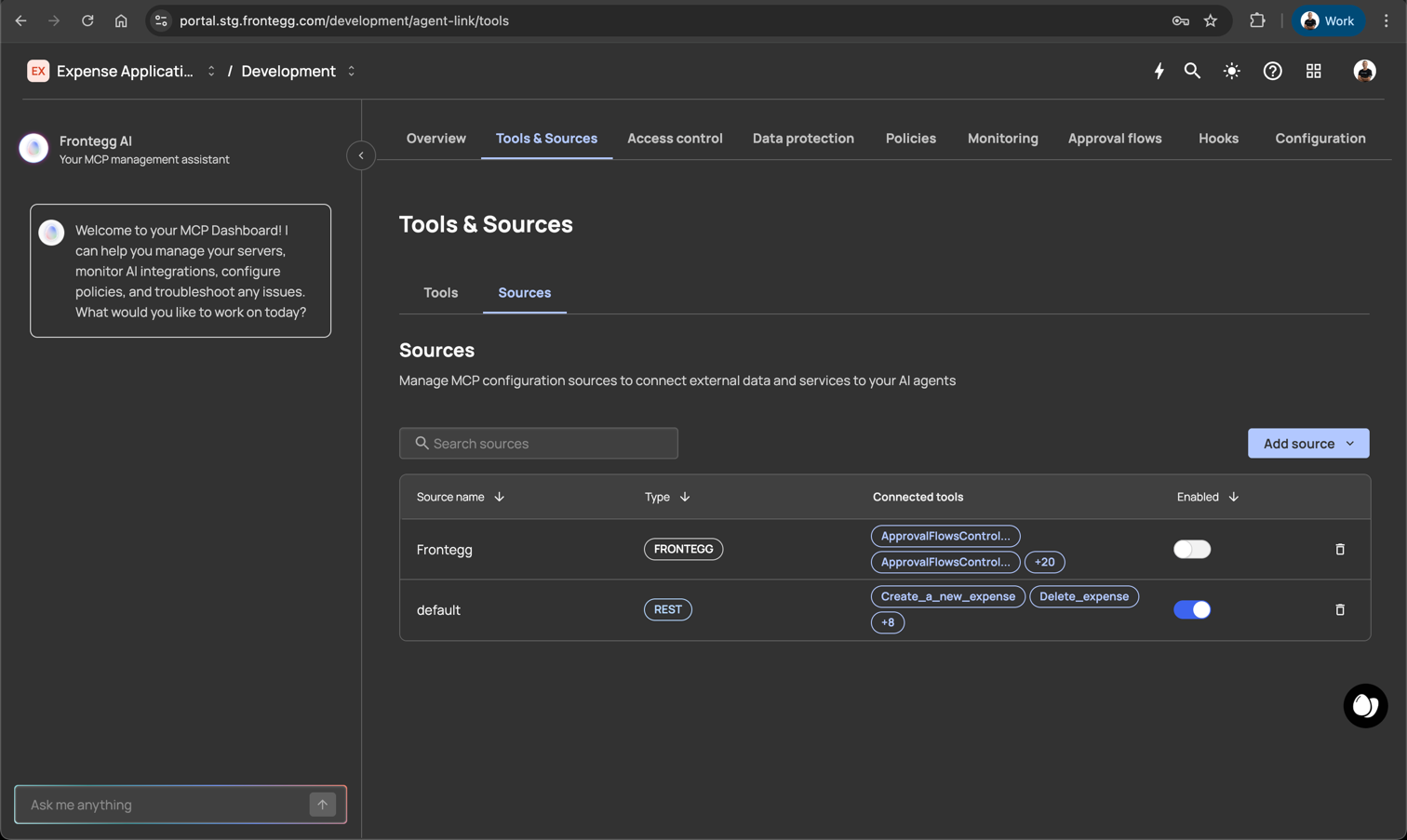
Figure 2: The Tools & Sources page showing the Frontegg source in the Sources list
Click into the Frontegg source to view and enable the specific tools you want to expose to your customers.
Action:
- Click on the Frontegg row in the Sources table
- View the Extracted tools panel on the right side
- Toggle ON the tools you want to make available to customers
The panel shows all available Frontegg tools (e.g., "0 of 20 enabled"). Each tool displays:
- Tool name (e.g.,
ApprovalFlowsController_createApprovalFlow) - HTTP method (POST, DELETE, etc.)
- API endpoint path
- Enable/disable toggle
Policy-Related Tools to Enable:
| Tool | Purpose |
|---|---|
| Policy tools (get, create, update) | Allow tenants to view and define their own policies |
| ApprovalFlowsController tools | Enable tenants to configure approval workflows |
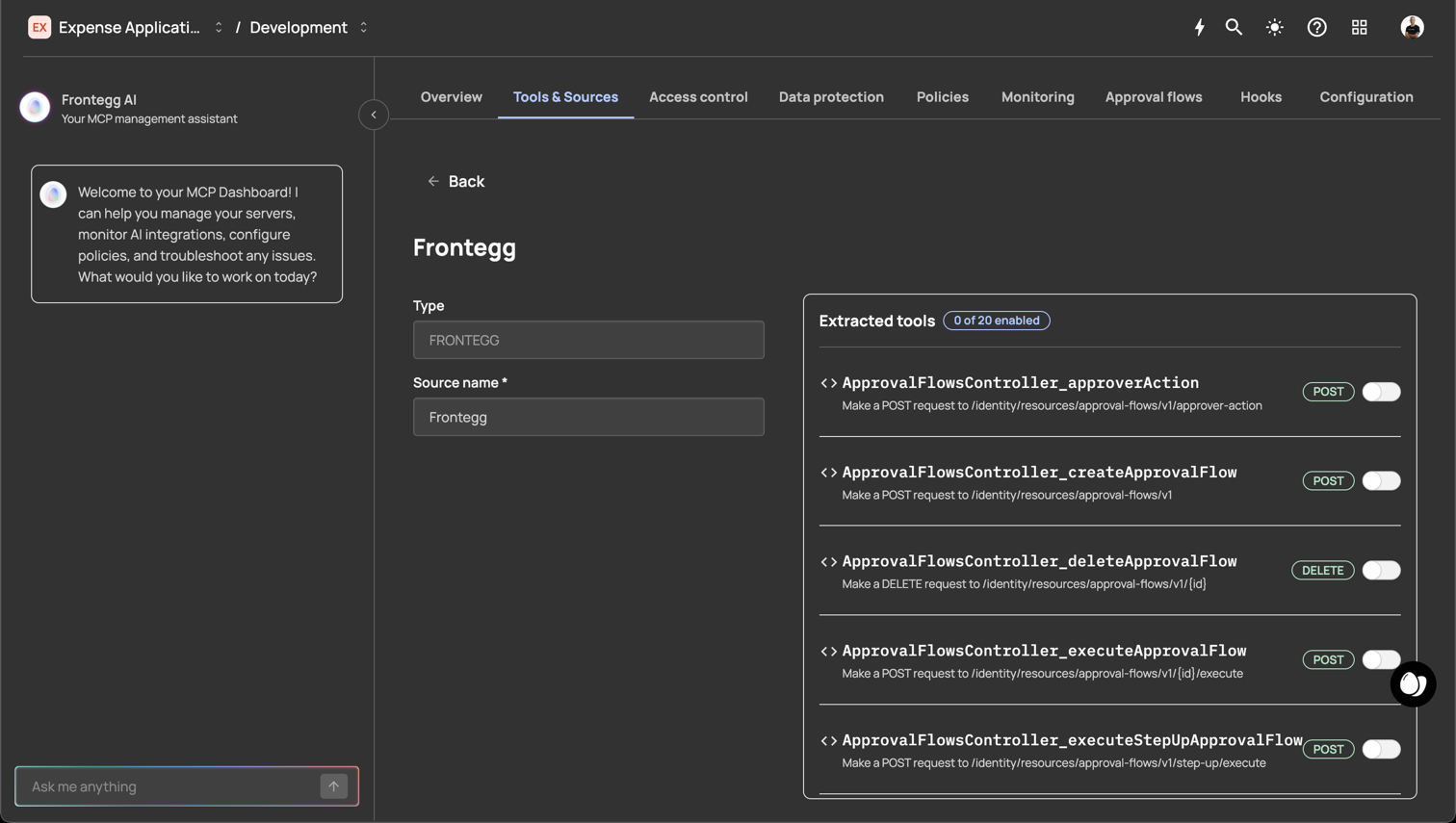
Figure 3: The Frontegg source detail page showing extracted tools with individual enable toggles
Tip: Start by enabling read-only tools (
get_policies) before enabling write tools (create_policy,delete_policy).
Once you've enabled the policy management tools, your customers will see these new capabilities in their AI interface.
Important: After enabling new tools, customers may need to reconnect their AI assistant to discover the newly available tools.
What Customers Will See:
- New tools appear in the AI interface tool list
- Tools are labeled clearly (e.g., "Get Policies", "Define Policies")
- Tool descriptions explain what each capability does
Customer Action Required:
- Customer opens their AI assistant (Claude, ChatGPT, etc.)
- If tools don't appear, customer reconnects to your platform's MCP server
- New policy management tools become available
With tools enabled, your customers can now define their organization's AI policies through natural conversation with their AI assistant.
Example Customer Interactions:
Customer: "Create a policy that requires approval for any
          expense over $5,000"

AI:       "I'll create an approval policy for expenses. Here's
          what I'll set up:

          Policy Name: High-Value Expense Approval
          Trigger: expense_submission where amount > 5000
          Action: require_approval
          Approvers: Manager role

          Should I create this policy?"

Customer: "Yes, and also add that anything over $25,000 needs
          CFO approval"

AI:       "Done. I've created two policies:

          1. High-Value Expense Approval ($5K-$25K → Manager)
          2. Executive Expense Approval ($25K+ → CFO)

          Both are now active for your organization."
Key Benefits of Conversational Policy Definition:
- No technical expertise required
- Natural language understanding
- Instant validation and feedback
- Policy templates and suggestions
All tenant-created policies are visible in the AgentLink UI, clearly marked as customer-specific.
What You'll See:
- Policies organized by tenant/customer
- Clear labeling: "Customer Defined" vs "Platform Default"
- Policy details including conditions, actions, and audit status
- Ability to view (but not modify) customer policies
Policy Visibility Matrix:
| Policy Type | Platform Admin Can See | Platform Admin Can Edit | Tenant Admin Can See | Tenant Admin Can Edit |
|---|---|---|---|---|
| Platform Policy | Yes | Yes | No | No |
| Tenant Policy | Yes | Yes | Yes | Yes |
Understanding how policies interact is critical for effective governance.
Level 1: Platform Policies (Highest Priority)
    │
    │    Cannot be overridden
    │    Example: "No bulk data exports allowed"
    │
    ▼
Level 2: Tenant Policies
    │
    │    Can restrict further, cannot expand beyond platform limits
    │    Example: "Require approval for exports > 100 records"
    │
    ▼
Level 3: Default Behavior (Lowest Priority)

    Applied when no specific policy matches
Example: "Allow read access to non-sensitive data"| Rule | Description | Example |
|---|---|---|
| Restrictive Inheritance | Tenant policies can only be MORE restrictive than platform policies | Platform allows up to $100K transactions; Tenant can limit to $50K, but not raise to $150K |
| Additive Conditions | Tenants can add conditions to allowed actions | Platform allows data access; Tenant adds "only during business hours" |
| No Override | Platform-blocked actions cannot be enabled at tenant level | Platform blocks "delete_all"; Tenant cannot create "allow delete_all" |
| Default Pass-Through | If no tenant policy exists, platform policy applies | Platform allows read; No tenant policy = read allowed |
When multiple policies could apply, AgentLink uses this resolution order:
- Explicit Deny always wins (at any level)
- Platform Policy takes precedence over Tenant Policy
- More Specific policy wins over general policy
- Most Restrictive policy wins when specificity is equal
| Practice | Why It Matters |
|---|---|
| Define clear platform boundaries | Prevents tenants from creating unsafe policies |
| Start with minimal tenant permissions | Easier to expand than restrict |
| Provide policy templates | Helps customers get started quickly |
| Document what tenants can/cannot do | Reduces support requests |
| Monitor tenant policy usage | Identify training opportunities |
| Practice | Why It Matters |
|---|---|
| Start with read-only policies | Test understanding before creating restrictions |
| Use approval workflows | Catch mistakes before they impact users |
| Document policy rationale | Future admins need context |
| Review policies quarterly | Business needs change |
| Test policies in staging first | Prevent production disruptions |
Use consistent, descriptive names:
✅ Good:
   - "Finance Team - Expense Approval Over 5K"
   - "HIPAA - PHI Access Logging Required"
   - "Engineering - Deploy Requires PR Approval"

❌ Bad:
   - "Policy 1"
   - "New rule"
- "Test"Q: Can tenants see other tenants' policies?
A: No. Tenant policies are completely isolated. Each tenant only sees their own policies.
Q: What happens if a tenant deletes all their policies?
A: Platform default policies apply. The tenant's AI agents continue to function within platform-defined boundaries.
Q: Can tenants create policies that affect other tenants?
A: No. Tenant policies only affect their own organization's AI agents.
Q: How quickly do policy changes take effect?
A: Policy changes are typically active within 30 seconds of creation.
Q: Is there a limit to how many policies a tenant can create?
A: Default limit is 100 policies per tenant. Contact support to increase.
Q: Can policies be applied to specific users within a tenant?
A: Yes. Policies can target specific roles, groups, or individual users within a tenant.
Q: Are tenant policy changes logged?
A: Yes. All policy changes are logged with timestamp, user, and before/after states.
Q: Can we export tenant policies for compliance audits?
A: Yes. Policies can be exported in JSON, YAML, or PDF format.
Q: How do tenant policies work with SOC 2 requirements?
A: Tenant-level policies support SOC 2 by enabling customers to implement their own access controls while you maintain platform-level compliance.
Tenant-Level Policies transform your platform from a one-size-fits-all solution into a flexible, enterprise-ready AI governance platform. By delegating policy control to your customers while maintaining platform-level boundaries, you:
- Reduce support burden: Customers self-manage their requirements
- Accelerate enterprise adoption: Meet diverse compliance needs
- Increase customer satisfaction: Each tenant gets exactly the controls they need
- Maintain platform integrity: Your boundaries cannot be overridden
Enable Tenant-Level Policies today to unlock the full potential of delegated AI governance.