## Localizations for login box
Localizing login box components involves customizing various textual elements to cater to different languages. This includes setting custom text for labels, input placeholders, buttons, etc. In the Frontegg platform, you can define a localization object by specifying custom text for different sections, such as loginBox and adminPortal. Within the login box, you can customize the text for login and signup pages, including placeholders for email and password fields, social login button texts, and more. This approach ensures that users have a seamless experience whilst using your up. The following topic provides detailed examples and code snippets to help you customize your text elements.
### Examples
Here are some examples of popular and practical use cases for customizing text. For convenience, we divided them into Login Box and Admin Box localization.
Explore more
Check the `frontegg/types/Localizations/LoginBoxLocalizations/` folder for more examples.
#### Social login button text
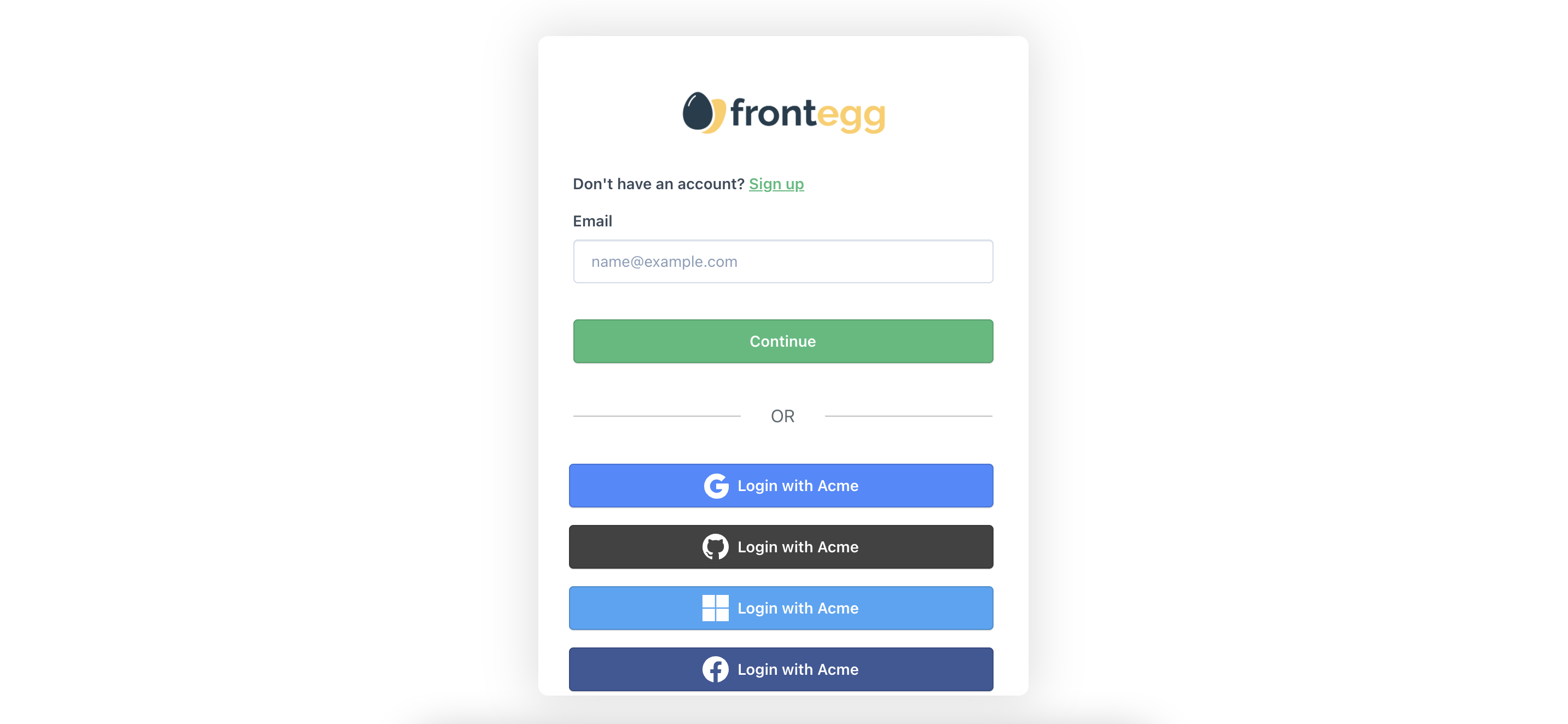
Set the text of your social login buttons. In `localizations` → `loginBox` → `socialLogins`, you can set custom text for the social login buttons.
Here is an example of the options with explanations:
```
const localizations = {
en: {
loginBox: {
socialLogins: {
/**
* Text to be display in socialLogin buttons if rendering inside login section
* Ex: 'Continue with {{providerName}}'
*/
loginButtonText: "Login with Acme",
/**
* Text to be display in socialLogin buttons if rendering inside signup section
* Ex: 'Login with {{providerName}}'
*/
signupButtonText: "Signup with Acme",
/**
* Text to be display in socialLogin buttons if rendering inside activation section
* Ex: 'Sign up with {{providerName}}'
*/
activationButtonText: "Signup with Acme",
/**
* Error title if social login callback is invalid
*/
failedInvalidCallbackUrl: "Please try again.",
/**
* Back to login button text in social login invalid section
*/
failedBackToLogin: "Login with Acme",
},
},
},
};
```
br
#### Submit button text
Set the text of your submit buttons. In various subsections within the `loginBox` section of your `localizations` object, you can set custom text for the submit buttons. You have several options based on the context and subsection.
Here is an example of two options with explanations within the login and signup subsections (The code in the sample above is from `frontegg/types/Localizations/LoginBoxLocalizations/login.d.ts` and `frontegg/types/Localizations/LoginBoxLocalizations/signup.d.ts`):
```
const localizations = {
en: {
loginBox: {
login: {
/**
* Login page submit button
*/
login: "Acme Login",
/**
* Login page submit button if passwordless, sso or magicLink is enabled
*/
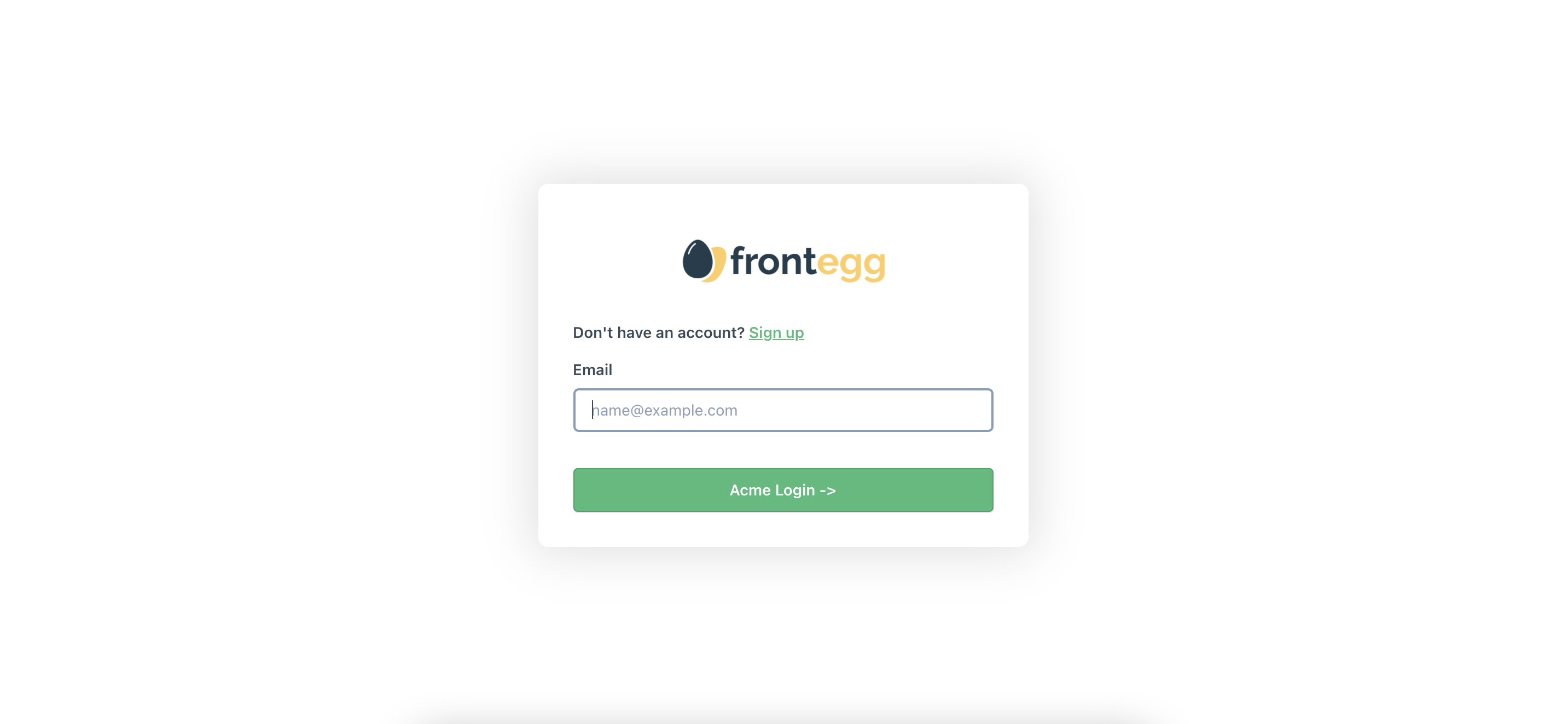
continue: "Acme Login ->",
},
signup: {
/**
* Signup page submit button
*/
signupButtonText: "Signup",
},
},
},
};
```
br
Here is what the code would translate to in the login page:
#### Controlling the social logins divider
You can change the text on the social logins divider by using the `localizations` option:
```
const localizationsOverrides: LocalizationsOverrides = {
en: {
loginBox: {
login: {
signInWithSocialLogin: 'OR'
}
}
}
}
```
br
In this example, instead of the `OR SIGN IN WITH' text, there will be just `OR.
#### Login label texts
Set the text of the labels in your Login Box. In the `loginBox` section of your `localizations` object, you can set custom text for the input labels.
You have several options based on the context.
Here is an example of label options with explanations for both the `login` and signup` sections. The code in the sample above is from `frontegg/types/Localizations/LoginBoxLocalizations/login.d.ts` and `frontegg/types/Localizations/LoginBoxLocalizations/signup.d.ts`:
```
const localizations = {
en: {
loginBox: {
login: {
/**
* Login email input label
*/
emailInputLabel: "Please enter your email",
/**
* Login password input label
*/
passwordInputLabel: "Please enter your password",
/**
* Login with MFA six digits input label If MFA is enabled
*/
mfaInputLabel: "Please enter your 6 digits",
/**
* Otc input label
*/
otcInputLabel: "OTC Login Here",
/**
* Force MFA section input label
*/
forceMfaInputLabel: "Force MFA Here",
},
signup: {
/**
* Signup name input label
*/
nameInputLabel: "Please enter your name",
/**
* Signup email input label
*/
emailInputLabel: "Please enter your email",
/**
* Signup password input label
*/
passwordInputLabel: "Please enter your password",
/**
* Signup company name input label
* this input is optional
*/
companyNameInputLabel: "Please enter your company name",
},
},
},
};
```
#### Login-signup text
Set the text in your Login Box where it asks the user to change from the login page to the signup page and vice versa.
WithIn the `loginBox.login` section of your `localizations` object, you can set custom text in your login page for your signup message and button. In the `loginBox.signup` section, you can set custom text for for the login message and button in your sign up page.
Here is an example of label options with explanations:
br
```
const localizations = {
en: {
loginBox: {
login: {
/**
* Go to signup message in Login page header
*/
signUpMessage: "Do you want to signup for Acme? ",
/**
* Go to signup link button text in Login page header
*/
signUpLink: "Signup free!",
},
signup: {
/**
* Go to login message in signup page header
*/
loginMessage: "Do you want to login to your Acme account? ",
/**
* Go to login link button text in signup page header
*/
loginLink: "Login here!",
},
},
},
};
```
br
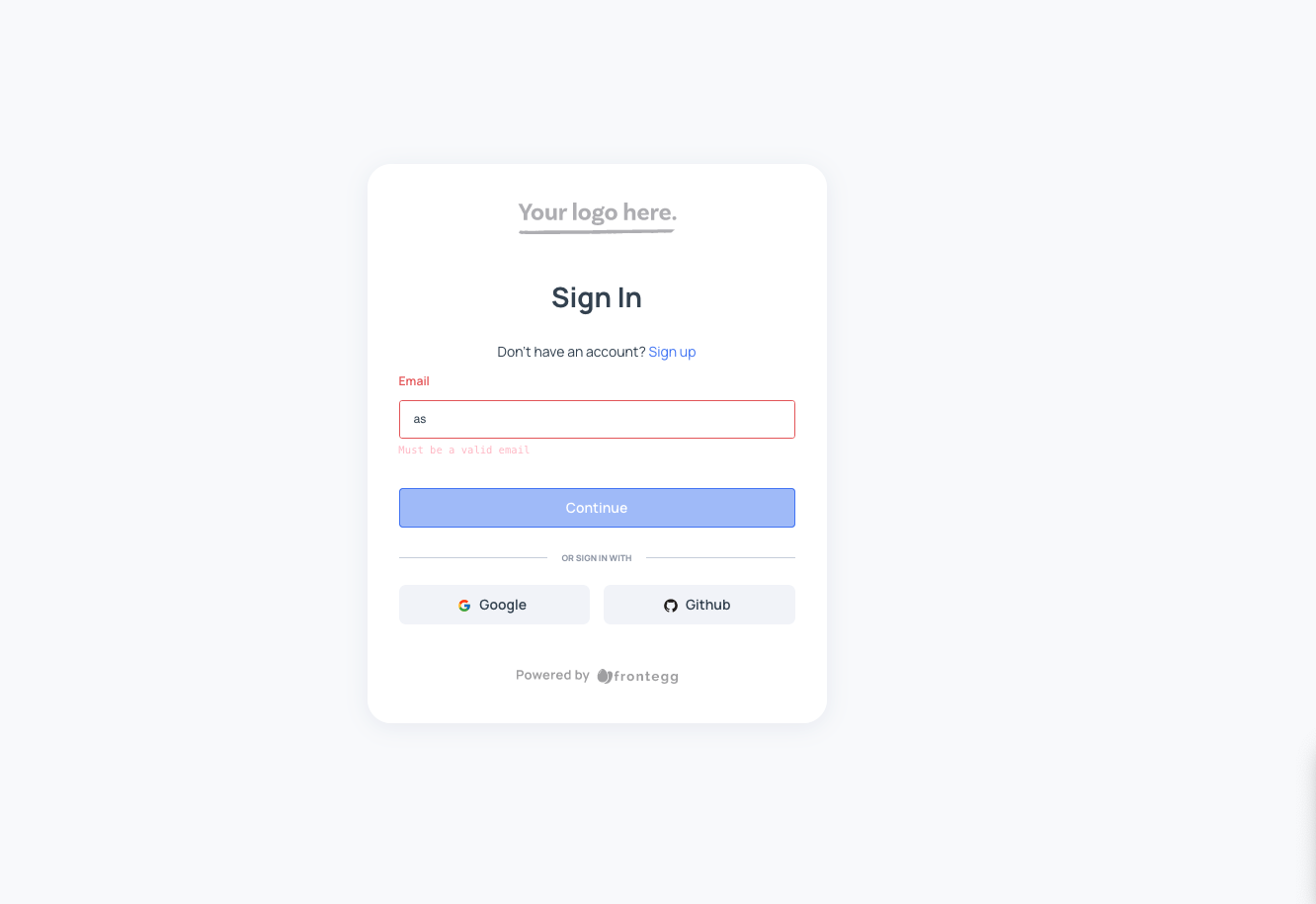
Here is what the code above looks like on the login page:
Here is what the code above looks like on the signup page:

#### Input placeholders
Set the text for your input placeholders in your self-service portal and Login Box.
In the `adminPortal` and `loginBox` sections of your `localizations` object, you can set custom text for the input placeholders.
Here are just a few examples of customizing input placeholders with explanations:
```
const localizations = {
en: {
loginBox: {
login: {
/**
* String displayed as placeholder when email field is empty
*/
emailInputPlaceholder: "Your email for Acme login",
/**
* String displayed as placeholder when password field is empty
*/
passwordInputPlaceholder: "Your Acme login password",
/**
* Recover Code input placeholder in MFA recovery section
*/
enterRecoveryCode: "Acme Recovery Code",
/**
* Otc input placeholder
*/
otcInputPlaceholder: "Acme OTC",
/**
* Force MFA section input placeholder
*/
forceMfaInputPlaceholder: "MFA Input Acme",
},
signup: {
/**
* Signup name input placeholder
*/
nameInputPlaceholder: "Your name for Acme account",
/**
* Signup email input placeholder
*/
emailInputPlaceholder: "Your email for Acme login",
/**
* Signup password input placeholder
*/
passwordInputPlaceholder: "A secure password for Acme login",
/**
* Signup company name input placeholder
* this input is optional
*/
companyNameInputPlaceholder: "Your company name with Acme",
},
},
},
};
```
#### Changing text on your social login divider
```
const localizationsOverrides = {
en: {
loginBox: {
login: {
signInWithSocialLogin: 'OR'
}
}
}
}
```
#### Switching a language button in your login box
```
// Dictionary for example:
const localizations = {
en: {
adminPortal: {
users: {
userHeader: "Acme User",
rolesHeader: "Acme Roles",
joinedHeader: "Joined Acme",
lastSeenHeader: "Last Seeeneeen",
},
},
loginBox: {
login: {
title: "Log in",
emailInputLabel: "Email",
emailInputPlaceholder: "name@example.com",
emailMustBeValid: "Must be a valid email",
continue: "Continue",
passwordInputLabel: "Password",
forgotPassword: "Forgot your password?",
passwordInputPlaceholder: "Password",
login: "Log in",
disclaimerText: "I agree to the",
privacyLinkText: "Privacy Policy "
},
activateAccount: {
title: "Activate your account",
newPasswordInputLabel: "New password",
newPasswordInputPlaceholder: "Set password",
confirmPasswordInputLabel: "Confirm new password",
confirmPasswordInputPlaceholder: "Re-enter password",
activateButton: "Activate",
disclaimerCheckboxLabel: "I agree to the",
privacyLinkText: "Privacy Policy"
},
forgetPassword: {
title: "Forgot your password?",
description: "Enter the email address associated with your account and we'll send you a link to reset your password",
emailInputLabel: "Email",
emailInputPlaceholder: "name@example.com",
submitButtonText: "Remind me",
backToLogin: "Back to login",
},
resetPassword: {
title: "Reset password",
description: "",
newPasswordInputLabel: "New password",
newPasswordInputPlaceholder: "Set password",
confirmPasswordInputLabel: "Confirm new password",
confirmPasswordInputPlaceholder: "Re-enter password",
resetPasswordButton: "Reset password"
}
},
},
es: {
loginBox: {
login: {
title: "Iniciar sesión",
emailInputLabel: "Correo electrónico",
emailInputPlaceholder: "name@example.com",
emailMustBeValid: "Debe ser un correo electrónico válido",
continue: "Continúe",
passwordInputLabel: "Contraseña",
forgotPassword: "¿Olvidó su contraseña?",
passwordInputPlaceholder: "Contraseña",
login: "Iniciar sesión",
disclaimerText: "Estoy de acuerdo con la",
privacyLinkText: "política de privacidad"
},
activateAccount: {
title: "Active su cuenta",
newPasswordInputLabel: "Nueva contraseña",
newPasswordInputPlaceholder: "Establecer contraseña",
confirmPasswordInputLabel: "Confirme la nueva contraseña",
confirmPasswordInputPlaceholder: "Vuelva a introducir la contraseña",
activateButton: "Activar",
disclaimerCheckboxLabel: "Estoy de acuerdo con la",
privacyLinkText: "política de privacidad"
},
forgetPassword: {
title: "¿Olvidó su contraseña?",
description: "Introduzca la dirección de correo electrónico asociada a su cuenta y le enviaremos un enlace para restablecer su contraseña",
emailInputLabel: "Correo electrónico",
emailInputPlaceholder: "name@example.com",
submitButtonText: "Recordarme",
backToLogin: "Volver al inicio de sesión",
},
resetPassword: {
title: "Restablecer contraseña",
description: "",
newPasswordInputLabel: "Nueva contraseña",
newPasswordInputPlaceholder: "Establecer contraseña",
confirmPasswordInputLabel: "Confirme la nueva contraseña",
confirmPasswordInputPlaceholder: "Vuelva a introducir la contraseña",
resetPasswordButton: "Restablecer contraseña"
}
},
},
de: {
loginBox: {
login: {
title: "Anmelden",
emailInputLabel: "E-Mail-Adresse",
emailInputPlaceholder: "name@beispiel.com",
emailMustBeValid: "Es muss eine gültige E-Mail-Adresse sein",
continue: "Fortfahren",
passwordInputLabel: "Passwort",
forgotPassword: "Passwort vergessen?",
passwordInputPlaceholder: "Anmelden",
login: "Anmelden",
disclaimerText: "Ich stimme den",
privacyLinkText: "Datenschutzbestimmungen zu"
},
activateAccount: {
title: "Aktivieren Sie Ihr Konto",
newPasswordInputLabel: "Neues Passwort",
newPasswordInputPlaceholder: "Passwort festlegen",
confirmPasswordInputLabel: "Neues Passwort bestätigen",
confirmPasswordInputPlaceholder: "Passwort erneut eingeben",
activateButton: "Aktivieren",
disclaimerCheckboxLabel: "Ich stimme den",
privacyLinkText: "Datenschutzbestimmungen zu"
},
forgetPassword: {
title: "Passwort vergessen?",
description: "Geben Sie die E-Mail-Adresse ein, die mit Ihrem Konto verknüpft ist. Wir schicken Ihnen dann einen Link, um Ihr Passwort zurückzusetzen",
emailInputLabel: "E-Mail-Adresse",
emailInputPlaceholder: "name@beispiel.com",
submitButtonText: "Mich erinnern",
backToLogin: "Zurück zur Anmeldung",
},
resetPassword: {
title: "Passwort zurücksetzen",
description: "Passwort zurücksetzen",
newPasswordInputLabel: "Neues Passwort",
newPasswordInputPlaceholder: "Passwort festlegen",
confirmPasswordInputLabel: "Neues Passwort bestätigen",
confirmPasswordInputPlaceholder: "Passwort erneut eingeben",
resetPasswordButton: "Passwort zurücksetzen"
}
},
},
fr: {
loginBox: {
login: {
title: "Se connecter",
emailInputLabel: "Courriel",
emailInputPlaceholder: "nom@exemple.com",
emailMustBeValid: "Doit être un courriel valide",
continue: "Continuer ",
passwordInputLabel: "Mot de passe",
forgotPassword: "Mot de passe oublié ?",
passwordInputPlaceholder: "",
login: "Se connecter",
disclaimerText: "Je suis d'accord avec la",
privacyLinkText: "politique de confidentialité"
},
activateAccount: {
title: "Activez votre compte",
newPasswordInputLabel: "Nouveau mot de passe",
newPasswordInputPlaceholder: "Définir le mot de passe",
confirmPasswordInputLabel: "Confirmer le nouveau mot de passe",
confirmPasswordInputPlaceholder: "Ressaisir le mot de passe",
activateButton: "Activer",
disclaimerCheckboxLabel: "Je suis d'accord avec la",
privacyLinkText: "politique de confidentialité"
},
forgetPassword: {
title: "Mot de passe oublié ?",
description: "Saisissez l'adresse courriel associée à votre compte et nous vous enverrons un lien pour réinitialiser votre mot de passe",
emailInputLabel: "Courriel",
emailInputPlaceholder: "nom@exemple.com",
submitButtonText: "Me rappeler",
backToLogin: "Retour à la connexion",
},
resetPassword: {
title: "Réinitialiser le mot de passe",
description: "",
newPasswordInputLabel: "Nouveau mot de passe",
newPasswordInputPlaceholder: "Définir le mot de passe",
confirmPasswordInputLabel: "Confirmer le nouveau mot de passe",
confirmPasswordInputPlaceholder: "Ressaisir le mot de passe",
resetPasswordButton: "Réinitialiser le mot de passe"
}
},
},
}
```
br
### Login-box language translation
Frontegg provides the flexibility to translate your login flows into any language you desire. This capability allows you to customize and localize all login screens, ensuring a seamless and familiar experience for users across different regions and languages.
#### Step 1: Setting the language
**Hosted integration**
You will need to set up the language in the local storage, follow these steps.
1. When using the Frontegg hosted implementation, make sure to set up an endpoint that will serve your translation to the pages that are hosted by Frontegg, by following [Hosted and Embedded Setup](/ciam/sdks/customizations/configuration-old#customization-in-the-hosted-mode).
2. Follow [Google Tag Manager](/ciam/guides/integrations/third-party/google-tag-manager) guide to connect your GTM account to Frontegg.
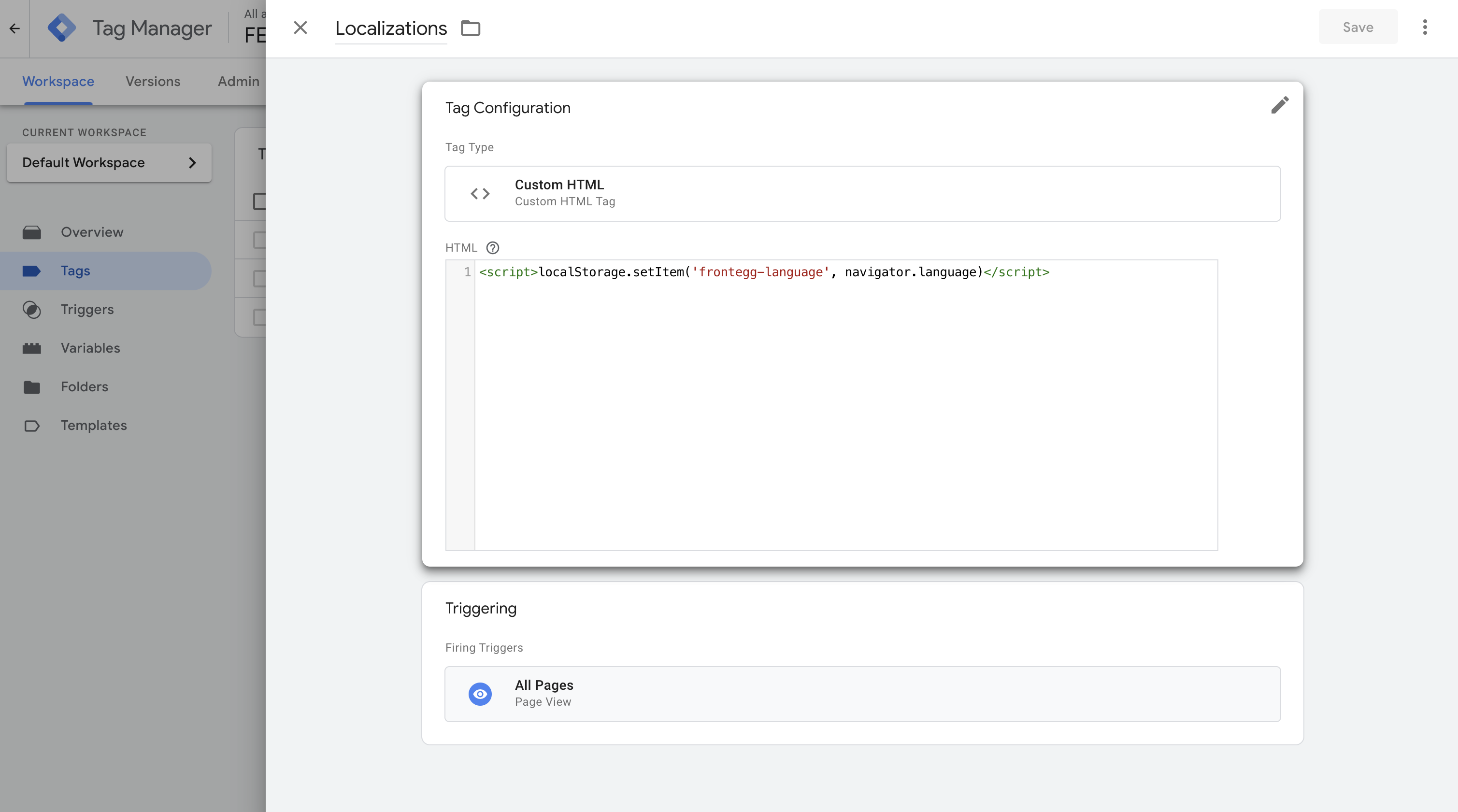
3. On your GTM account, create a custom HTML tag and set the trigger to be served on all pages, or only specific pages that you wish to translate. Add the below script to the tag:
```
```
br
br
**Embedded integration**
In order to translate your login box to any language with embedded integration you will need to add to your app.tsx file the following code (in addition to passing the relevant code in the `themeOptions` section mentioned above)
```
export const App = () => {
window.localStorage.setItem ('frontegg-language', )
}
```
#### Step 2: Overriding all login screens metadata
1. Hosted - Provide extra language through the metadata override
2. Embedded - The Frontegg embedded integration allows serving the localizations along with style changes directly to the browser via `FronteggProvider`. Full details are available in the [Hosted and Embedded setup](/ciam/guides/env-settings/hosted-embedded).
[Using metadata overrides](/ciam/sdks/customizations/configuration-old#getting-started-with-metadataoverrides)
```
app.get("/overrides", cors(corsOptions), (req, res) =>
res.send({
themeV2: {
loginBox: {
signup: {
splitFullName: true,
},
},
},
localizations: {
en: {
adminPortal: {
users: {
userHeader: "Acme User",
rolesHeader: "Acme Roles",
joinedHeader: "Joined Acme",
lastSeenHeader: "Last Seeeneeen",
},
},
loginBox: {
login: {
title: "Log in",
emailInputLabel: "Email",
emailInputPlaceholder: "name@example.com",
emailMustBeValid: "Must be a valid email",
continue: "Continue",
passwordInputLabel: "Password",
forgotPassword: "Forgot your password?",
passwordInputPlaceholder: "Password",
login: "Log in",
disclaimerText: "I agree to the",
privacyLinkText: "Privacy Policy ",
},
activateAccount: {
title: "Activate your account",
newPasswordInputLabel: "New password",
newPasswordInputPlaceholder: "Set password",
confirmPasswordInputLabel: "Confirm new password",
confirmPasswordInputPlaceholder: "Re-enter password",
activateButton: "Activate",
disclaimerCheckboxLabel: "I agree to the",
privacyLinkText: "Privacy Policy",
},
forgetPassword: {
title: "Forgot your password?",
description:
"Enter the email address associated with your account and we'll send you a link to reset your password",
emailInputLabel: "Email",
emailInputPlaceholder: "name@example.com",
submitButtonText: "Remind me",
backToLogin: "Back to login",
},
resetPassword: {
title: "Reset password",
description: "",
newPasswordInputLabel: "New password",
newPasswordInputPlaceholder: "Set password",
confirmPasswordInputLabel: "Confirm new password",
confirmPasswordInputPlaceholder: "Re-enter password",
resetPasswordButton: "Reset password",
},
},
},
es: {
loginBox: {
login: {
title: "Iniciar sesión",
emailInputLabel: "Correo electrónico",
emailInputPlaceholder: "name@example.com",
emailMustBeValid: "Debe ser un correo electrónico válido",
continue: "Continúe",
passwordInputLabel: "Contraseña",
forgotPassword: "¿Olvidó su contraseña?",
passwordInputPlaceholder: "Contraseña",
login: "Iniciar sesión",
disclaimerText: "Estoy de acuerdo con la",
privacyLinkText: "política de privacidad",
},
activateAccount: {
title: "Active su cuenta",
newPasswordInputLabel: "Nueva contraseña",
newPasswordInputPlaceholder: "Establecer contraseña",
confirmPasswordInputLabel: "Confirme la nueva contraseña",
confirmPasswordInputPlaceholder:
"Vuelva a introducir la contraseña",
activateButton: "Activar",
disclaimerCheckboxLabel: "Estoy de acuerdo con la",
privacyLinkText: "política de privacidad",
},
forgetPassword: {
title: "¿Olvidó su contraseña?",
description:
"Introduzca la dirección de correo electrónico asociada a su cuenta y le enviaremos un enlace para restablecer su contraseña",
emailInputLabel: "Correo electrónico",
emailInputPlaceholder: "name@example.com",
submitButtonText: "Recordarme",
backToLogin: "Volver al inicio de sesión",
},
resetPassword: {
title: "Restablecer contraseña",
description: "",
newPasswordInputLabel: "Nueva contraseña",
newPasswordInputPlaceholder: "Establecer contraseña",
confirmPasswordInputLabel: "Confirme la nueva contraseña",
confirmPasswordInputPlaceholder:
"Vuelva a introducir la contraseña",
resetPasswordButton: "Restablecer contraseña",
},
},
},
de: {
loginBox: {
login: {
title: "Anmelden",
emailInputLabel: "E-Mail-Adresse",
emailInputPlaceholder: "name@beispiel.com",
emailMustBeValid: "Es muss eine gültige E-Mail-Adresse sein",
continue: "Fortfahren",
passwordInputLabel: "Passwort",
forgotPassword: "Passwort vergessen?",
passwordInputPlaceholder: "Anmelden",
login: "Anmelden",
disclaimerText: "Ich stimme den",
privacyLinkText: "Datenschutzbestimmungen zu",
},
activateAccount: {
title: "Aktivieren Sie Ihr Konto",
newPasswordInputLabel: "Neues Passwort",
newPasswordInputPlaceholder: "Passwort festlegen",
confirmPasswordInputLabel: "Neues Passwort bestätigen",
confirmPasswordInputPlaceholder: "Passwort erneut eingeben",
activateButton: "Aktivieren",
disclaimerCheckboxLabel: "Ich stimme den",
privacyLinkText: "Datenschutzbestimmungen zu",
},
forgetPassword: {
title: "Passwort vergessen?",
description:
"Geben Sie die E-Mail-Adresse ein, die mit Ihrem Konto verknüpft ist. Wir schicken Ihnen dann einen Link, um Ihr Passwort zurückzusetzen",
emailInputLabel: "E-Mail-Adresse",
emailInputPlaceholder: "name@beispiel.com",
submitButtonText: "Mich erinnern",
backToLogin: "Zurück zur Anmeldung",
},
resetPassword: {
title: "Passwort zurücksetzen",
description: "Passwort zurücksetzen",
newPasswordInputLabel: "Neues Passwort",
newPasswordInputPlaceholder: "Passwort festlegen",
confirmPasswordInputLabel: "Neues Passwort bestätigen",
confirmPasswordInputPlaceholder: "Passwort erneut eingeben",
resetPasswordButton: "Passwort zurücksetzen",
},
},
},
fr: {
loginBox: {
login: {
title: "Se connecter",
emailInputLabel: "Courriel",
emailInputPlaceholder: "nom@exemple.com",
emailMustBeValid: "Doit être un courriel valide",
continue: "Continuer ",
passwordInputLabel: "Mot de passe",
forgotPassword: "Mot de passe oublié ?",
passwordInputPlaceholder: "",
login: "Se connecter",
disclaimerText: "Je suis d'accord avec la",
privacyLinkText: "politique de confidentialité",
},
activateAccount: {
title: "Activez votre compte",
newPasswordInputLabel: "Nouveau mot de passe",
newPasswordInputPlaceholder: "Définir le mot de passe",
confirmPasswordInputLabel: "Confirmer le nouveau mot de passe",
confirmPasswordInputPlaceholder: "Ressaisir le mot de passe",
activateButton: "Activer",
disclaimerCheckboxLabel: "Je suis d'accord avec la",
privacyLinkText: "politique de confidentialité",
},
forgetPassword: {
title: "Mot de passe oublié ?",
description:
"Saisissez l'adresse courriel associée à votre compte et nous vous enverrons un lien pour réinitialiser votre mot de passe",
emailInputLabel: "Courriel",
emailInputPlaceholder: "nom@exemple.com",
submitButtonText: "Me rappeler",
backToLogin: "Retour à la connexion",
},
resetPassword: {
title: "Réinitialiser le mot de passe",
description: "",
newPasswordInputLabel: "Nouveau mot de passe",
newPasswordInputPlaceholder: "Définir le mot de passe",
confirmPasswordInputLabel: "Confirmer le nouveau mot de passe",
confirmPasswordInputPlaceholder: "Ressaisir le mot de passe",
resetPasswordButton: "Réinitialiser le mot de passe",
},
},
},
},
})
);
app.listen(8000, () => console.log("Example app is listening on port 8000."));
```
```
import { useState } from 'react';
import { LoginBoxThemeOptions } from '@frontegg/types/ThemeOptions/LoginBoxTheme';
import { CustomComponent, FronteggThemeOptions } from '@frontegg/types/ThemeOptions';
// Create a custom component of switch language button for the footer box
const CustomFooterBox: CustomComponent = () => {
const [selectedLocale, setSelectedLocale] = useState(localStorage.getItem('frontegg-language') || 'en');
const handleLocaleChange = (event: React.ChangeEvent) => {
const locale = event.target.value;
setSelectedLocale(locale);
localStorage.setItem('frontegg-language', locale);
console.log(`Locale updated to "${locale}" and localStorage updated`);
window.location.reload(); // Refresh the page
};
return (